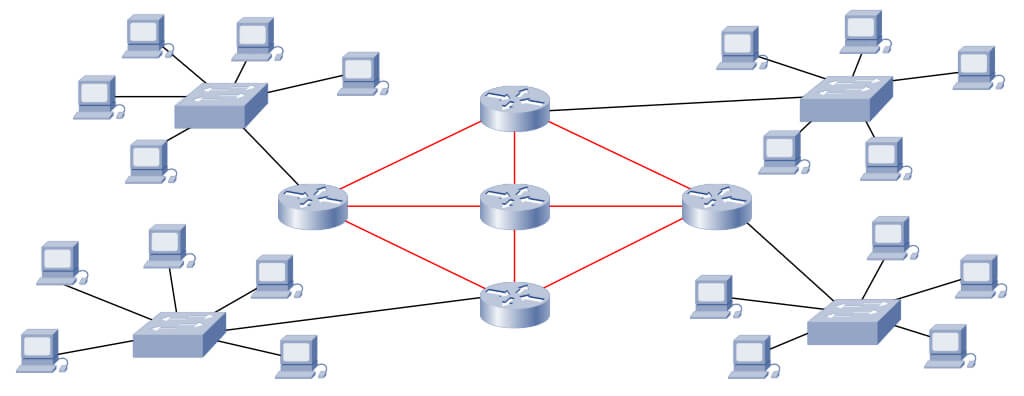
Understand how a network design defines architecture, topology, infrastructure, active equipment, cabling, security, documentation, testing, and validation criteria.
Check it out!
Network design is the technical planning of the logical and physical infrastructure that connects users, systems, servers, internet access, Wi-Fi, IP telephony, CFTV, access control, automation, and other corporate applications. It defines network architecture, network topology, addressing, segmentation, active equipment, network infrastructure, cabling, fiber optics, racks, security, redundancy, documentation, and validation criteria.
In corporate, industrial, and critical environments, network design reduces improvisation, organizes procurement, improves implementation predictability, and creates a technical basis for maintenance, expansion, and integration of new systems.
This article explains the stages of a network design, the main technical requirements, the documents generated, testing criteria, and the relationship with structured cabling design, fiber-optic backbone, network certification, and telecommunications design.
What Must a Network Design Define?
A complete network design transforms operational needs into verifiable technical decisions. It is not limited to selecting switches or cables: it defines how the infrastructure will be organized, sized, protected, documented, implemented, and validated.
| Area | Expected design definition |
|---|---|
| Requirements | Users, systems, applications, traffic, availability, security, and growth. |
| Architecture | Layers, modules, concentration points, L2/L3 boundaries, and failure domains. |
| Topology | Physical and logical interconnections, primary paths, and redundant paths. |
| Logical network | IP addressing, VLANs, subnets, routing, zones, and communication policies. |
| Infrastructure | Racks, cabling, fiber optics, pathways, power, environment, and grounding. |
| Active equipment | Switches, routers, firewalls, access points, transceivers, and interfaces. |
| Validation | Certification, performance, failover, authentication, security, and acceptance criteria. |
| Documentation | Drawings, diagrams, matrices, lists, design reports, specifications, and as-built documentation. |
Network Design, Architecture, Topology, and Infrastructure: What Is the Difference?
| Topic | Main responsibility | Further reading |
|---|---|---|
| Network design | Engineering process, requirements, decisions, deliverables, implementation, and validation. | This article. |
| Network architecture | Layers, modules, segmentation, availability, capacity, and security. | Corporate Network Architecture. |
| Network topology | How devices are interconnected and how communication paths are arranged. | Network Topology. |
| Network infrastructure | Physical components, active equipment, spaces, and resources that support communication. | Network Infrastructure. |
| Cabling design | Passive infrastructure, outlets, racks, cables, backbone, identification, and certification. | Structured Cabling Design. |
| Network implementation | Installation, configuration, migration, commissioning, and testing. | Implementation and validation stages in this article. |
Architecture, infrastructure, and acceptance criteria need to originate from the same technical scope.
Telecommunications Design integrates network requirements, cabling, active equipment, interfaces, documentation, and validation criteria into a single basis for procurement and implementation.
Basic Network Requirements:
The basic requirements of a network can be summarized in three fundamental aspects:
- Availability,
- Accessibility
- Scalability.
Each of these items is described in detail below.
1. Availability
Availability refers to the network’s ability to remain operational and accessible to users whenever needed, minimizing interruptions and downtime.
2. Accessibility
Accessibility is the ability of authorized users and devices to connect to the network and access the required resources and services efficiently and securely.
3. Scalability
Scalability is the network’s ability to grow and adapt to increases in demand, whether in the number of users, data volume, or integration of new applications, without significant loss of performance.
Stages of Network Design Development
Stage 1: Identifying Needs;
Designing an existing network without a baseline turns assumptions into implementation risk.
Technical Due Diligence consolidates topology, assets, capacity, configurations, documentation, constraints, and nonconformities before the target architecture and modernization scope are defined.
Information Gathering
This phase is essential to project success because it establishes the foundation on which all subsequent activities will be built.
The objective is to understand in detail the client’s and stakeholders’ needs, expectations, and constraints in order to clearly define the scope, requirements, and goals of the network design.
Procedures and Activities:
- Stakeholder Identification:
- Activity: Prepare a stakeholder register identifying all people, groups, or organizations that may affect or be affected by the project.
- Result: Detailed list with names, roles, interests, levels of influence, and expectations for each stakeholder.
- Benefit: Enables effective management of expectations and communication with everyone involved.
- Requirements-Gathering Planning:
- Activity: Develop a plan for collecting project requirements, defining the techniques and tools to be used (interviews, workshops, questionnaires, observation, and document analysis).
- Result: Requirements-management plan aligned with best practices.
- Benefit: Ensures a systematic and comprehensive approach to information gathering.
- Gathering Functional and Nonfunctional Requirements:
- Activity: Conduct data-gathering sessions using the planned techniques.
- Individual interviews with key users and managers.
- Collaborative workshops with technical and operational teams.
- Structured questionnaires for a larger user group.
- Direct observation of current processes.
- Analysis of existing documents (network diagrams, performance reports, internal policies).
- Result: Detailed requirements document covering expected performance, security, scalability, usability, and compliance.
- Benefit: Ensures that all needs and expectations are captured completely and accurately.
- Activity: Conduct data-gathering sessions using the planned techniques.
- Analysis of Collected Requirements:
- Activity: Review and validate collected requirements to identify conflicts, ambiguities, or inconsistencies.
- Result: Clear, understandable, and feasible requirements ready to be incorporated into the project scope.
- Benefit: Reduces the risk of rework and future misunderstandings.
- Requirements Prioritization:
- Activity: Classify requirements based on criteria such as criticality, business impact, and technical feasibility.
- Result: Prioritized requirements list distinguishing essential, desirable, and optional items.
- Benefit: Helps focus efforts on the aspects most critical to project success.
- Definition of the Preliminary Project Scope:
- Activity: Prepare a preliminary scope statement defining what is included in and excluded from the project.
- Result: Scope document that will serve as the basis for detailed planning.
- Benefit: Establishes clear project boundaries, aligns expectations, and prevents undefined scope.
- Identification of Constraints and Assumptions:
- Activity: Document all constraints (budget, schedule, resources, technology) and assumptions considered during information gathering.
- Result: Detailed list of constraints and assumptions.
- Benefit: Provides context for planning and risk management, enabling proactive adjustments.
- Initial Risk Analysis:
- Activity: Identify potential risks based on the requirements and information collected.
- Result: Initial risk register with descriptions and estimated probability and impact.
- Benefit: Allows mitigation strategies to be developed from the earliest project stages.
- Communication Planning:
- Activity: Define communication needs for the identified stakeholders.
- Appropriate communication channels (meetings, reports, emails).
- Communication frequency and responsible parties.
- Result: Communications-management plan.
- Benefit: Ensures all stakeholders receive the necessary information in a timely and efficient manner.
- Activity: Define communication needs for the identified stakeholders.
- Requirements Validation with Stakeholders:
- Activity: Present the collected requirements to stakeholders for confirmation and approval.
- Result: Requirements formally validated and agreed upon.
- Benefit: Ensures stakeholder alignment and commitment, reducing the risk of future changes.
- Formal Documentation of Results:
- Activity: Consolidate all information into formal documents, including:
- Requirements document.
- Preliminary scope statement.
- Stakeholder register.
- Communications plan.
- Result: Complete set of approved documents that will serve as the basis for subsequent stages.
- Benefit: Provides transparency and serves as the official project reference.
- Activity: Consolidate all information into formal documents, including:
- Obtaining Formal Approvals:
- Activity: Request and obtain signatures or formal approvals for key documents.
- Result: Formal approval of the requirements and preliminary scope.
- Benefit: Formalizes stakeholder commitment and authorizes progression to the detailed-planning stage.
At the end of the information-gathering phase, it is possible to define matters such as:
- Specific client requirements.
- Number of users and devices.
- Types of applications and services to be used.
- Specific security and compliance needs.
- Growth expectations and future expansion.
- Identification of devices and services that will use the network.
- Survey of the areas to be covered by the network.
Challenge: One of the greatest challenges at this stage is correctly identifying all needs, avoiding undersizing or oversizing resources. Lack of detail can compromise project efficiency and longevity.
Care: Accurate communication with stakeholders is essential to avoid gaps in requirements gathering.
Stage 2: Network Planning and Design;
This phase is crucial for converting the collected requirements into a detailed plan that will guide successful project implementation.
Procedures and Activities:
- Development of the Project Management Plan:
- Activity: Create the project management plan integrating all aspects required for execution, monitoring, and control.
- Result: Formal document covering scope, schedule, cost, quality, human resources, communications, risks, procurement, and stakeholder plans.
- Benefit: Provides a clear and structured view of the project, aligning the team and stakeholders with the defined objectives and procedures.
- Detailed Scope Definition:
- Activity: Refine the preliminary scope based on validated requirements, detailing all deliverables and work required.
- Result: Project Scope Statement and Work Breakdown Structure (WBS), decomposing the work into manageable components.
- Benefit: Clarifies exactly what will be delivered, facilitating planning of activities, resources, and costs.
- Project Schedule Development:
- Activity: Identify and sequence the required activities, estimate their durations, and develop the schedule.
- Use techniques such as Network Diagram, Critical Path Method, and Gantt Charts.
- Result: Detailed schedule with milestones and start and finish dates for each activity.
- Benefit: Enables effective time management, helping ensure that the project is completed within the established schedule.
- Activity: Identify and sequence the required activities, estimate their durations, and develop the schedule.
- Human and Material Resource Planning:
- Activity: Identify the required team, define roles and responsibilities, and determine the necessary material resources (equipment and tools).
- Result: Human Resources Plan, Responsibility Assignment Matrix (RAM), and list of material resources.
- Benefit: Ensures the right people are allocated and material resources are available when needed.
- Cost Estimating and Budgeting:
- Activity: Estimate costs associated with each activity and resource and develop the project budget.
- Consider direct and indirect costs, contingency reserves, and management reserves.
- Result: Detailed budget and Cost Management Plan.
- Benefit: Helps ensure the project is financially feasible and expenditures are appropriately controlled.
- Activity: Estimate costs associated with each activity and resource and develop the project budget.
- Design of the Network Architecture and Topology:
- Activity: Design the physical and logical network topology, including:
- Physical Topology: Cable layout and location of devices (switches, routers, servers).
- Logical Topology: IP-addressing plan, network segmentation (VLANs), and routing protocols.
- Security: Definition of security zones and implementation of firewalls and intrusion detection and prevention systems.
- Redundancy and High Availability: Planning of redundant links, load balancing, and failover.
- Result: Detailed network diagrams, technical specifications, and implementation plans.
- Benefit: Ensures the network meets the defined performance, security, and scalability requirements.
- Activity: Design the physical and logical network topology, including:
- Technology and Equipment Selection:
- Activity: Determine which technologies, equipment, and software will be used.
- Alternatives Analysis: Evaluate different options in terms of performance, compatibility, cost, and support.
- Compatibility with Existing Infrastructure: Ensure smooth integration with current systems.
- Result: Bill of Materials (BOM) with detailed specifications and selected suppliers.
- Benefit: Ensures selected components are suitable and provide the best value.
- Activity: Determine which technologies, equipment, and software will be used.
- Network Security Planning:
- Activity: Develop a comprehensive security plan addressing:
- Security Policies: Definition of standards and procedures.
- Access Controls: Implementation of authentication, authorization, and accounting (AAA).
- Data Protection: Encryption, backups, and disaster recovery.
- Monitoring and Incident Response: Tools and processes for threat detection and response.
- Result: Detailed Network Security Plan.
- Benefit: Protects information assets and supports compliance with regulations and best practices.
- Activity: Develop a comprehensive security plan addressing:
- Quality Planning:
- Activity: Define project quality standards and the processes used to ensure they are achieved.
- Quality Metrics: Definition of key performance indicators (KPIs).
- Quality-Control Processes: Audits, inspections, and tests.
- Result: Quality Management Plan.
- Benefit: Ensures project deliverables meet the established quality criteria.
- Activity: Define project quality standards and the processes used to ensure they are achieved.
- Risk Planning:
- Activity: Identify potential risks, assess their probability and impact, and develop response strategies.
- Techniques: Brainstorming, SWOT analysis, and Ishikawa diagram.
- Result: Risk Register with response plans and responsible parties.
- Benefit: Minimizes surprises and prepares the team to address unforeseen events.
- Activity: Identify potential risks, assess their probability and impact, and develop response strategies.
- Communications Planning:
- Activity: Define how information will be distributed among the team and stakeholders.
- Communication Matrix: Who needs which information, when, and how it will be delivered.
- Result: Communications Management Plan.
- Benefit: Ensures everyone remains informed and aligned, reducing misunderstandings and delays.
- Activity: Define how information will be distributed among the team and stakeholders.
- Procurement Planning:
- Activity: Determine which products and services will be acquired externally and plan the procurement process.
- Procurement Documents: Specifications, terms of reference, and selection criteria.
- Result: Procurement Management Plan, contracts, or supplier agreements.
- Benefit: Ensures procurement is conducted efficiently and transparently while meeting project requirements.
- Activity: Determine which products and services will be acquired externally and plan the procurement process.
- Plan Integration and General Review:
- Activity: Consolidate all plans into a cohesive and consistent Project Plan.
- Result: Complete and integrated Project Management Plan.
- Benefit: Provides a central reference for all project activities, facilitating control and coordination.
- Plan Validation and Approval:
- Activity: Present the project plan to stakeholders for review, adjustments, and formal approval.
- Result: Formal Approval of the project plan.
- Benefit: Ensures stakeholder alignment and commitment before execution begins.
How Are Cisco References Incorporated Into Network Design?
Cisco is one of the world’s leading references in architecture, switching, routing, enterprise networks, industrial networks, and security. Its models and technologies can be used as references to demonstrate how principles of hierarchy, modularity, resilience, segmentation, and access control are converted into design requirements and deliverables.
This does not mean every design must exclusively use Cisco equipment. The final architecture may be Cisco, multivendor, or based on equivalent solutions, provided the requirements for performance, interoperability, security, operations, and lifecycle are demonstrated.
| Design decision | Applied reference | Deliverable or evidence |
|---|---|---|
| Network organization | Access, distribution, and core layers; modular architecture and collapsed core. | Architecture diagram and module definition. |
| Link redundancy | STP, RSTP, and MSTP; LACP and EtherChannel. | Redundancy matrix, preferred paths, and failover plan. |
| Switch capacity | Ports, uplinks, switching capacity, buffers, stacking, and management capabilities. | Sizing report and active-equipment specification. |
| Device power | PoE, classes, available power, and heating. | PoE load schedule and power criteria. |
| Segmentation | VLANs, subnets, ACLs, zones, VRFs, and communication policies. | VLAN matrix, addressing, and authorized flows. |
| Access control | 802.1X, NAC, AAA, and Cisco ISE. | Authentication, authorization, and access-profile matrix. |
| Asset security | Hardening, SSH, SNMPv3, AAA, port protection, and secure management. | Hardening checklist and configuration standard. |
| Industrial networks | Cisco industrial switching, redundancy, segmentation, and environmental requirements. | Industrial architecture and IT/OT communication matrix. |
| OT visibility | Cisco Cyber Vision and industrial-asset inventory. | Discovery, monitoring, and event-integration requirements. |
| Validation | Failover, throughput, latency, authentication, segmentation, and policies. | Test plan, results, and acceptance criteria. |
A Cisco architecture should originate from the environment’s requirements.
Product families, capabilities, and models should be defined only after architecture, sizing, security policies, and availability criteria have been established.
Step 3: Selection of Equipment and Technologies;
This phase is essential to ensure that the network infrastructure meets the performance, security, scalability and cost-benefit requirements defined in the previous steps.
Procedures and Activities:
- Review of Technical Requirements and Project Scope:
- Activity: Review in detail the functional and non-functional requirements defined during the information collection and planning stages.
- Result: Clear understanding of the specifications that equipment and technologies must meet.
- Benefit: Ensures that the selection is based on real requirements, avoiding inappropriate choices.
- Analysis of Available Technologies:
- Activity: Research and analyze current and emerging technologies that meet project requirements.
- Network Protocols: Ethernet, Wi-Fi 6, MPLS, SD-WAN, etc.
- Security Solutions: Next generation firewalls, intrusion detection and prevention systems (IDS/IPS), VPNs.
- Virtualization and Cloud Computing Technologies.
- Result: List of potential technologies with their characteristics, advantages and disadvantages.
- Benefit: Allows a comprehensive view of available options, considering innovations that can add value to the project.
- Activity: Research and analyze current and emerging technologies that meet project requirements.
- Equipment Assessment and Selection:
- Activity: Identify equipment (hardware and software) that supports the selected technologies.
- Network Devices: Switches, routers, access points, servers.
- Safety Equipment: Firewalls, IDS/IPS, authentication solutions.
- Cabling and Physical Infrastructure: Twisted pair cables, optical fiber, racks, connection panels.
- Assessment Criteria:
- Technical Performance: Throughput capacity, latency, number of ports, PoE support, etc.
- Compatibility: Integration with existing and future systems.
- Scalability: Possibility of expansion or upgrade.
- Reliability and Robustness: MTBF (Mean Time Between Failures), warranty, technical support.
- Security: Built-in security features, standards compliance.
- Total Cost of Ownership (TCO): Purchase price, operating costs, energy consumption.
- Result: List of recommended equipment with detailed specifications and justifications for the choice.
- Benefit: Ensures that selected equipment meets project needs efficiently and economically.
- Activity: Identify equipment (hardware and software) that supports the selected technologies.
- Analysis of Suppliers and Partners:
- Activity: Identify and evaluate potential suppliers for selected equipment and technologies.
- Credibility and Reputation: History in the market, feedback from previous customers.
- Support and Services: Availability of technical support, warranty services, after-sales assistance.
- Commercial Conditions: Prices, delivery times, payment terms.
- Result: Selection of reliable suppliers and strategic partners.
- Benefit: Minimizes risks associated with supply failures and ensures adequate support during and after implementation.
- Activity: Identify and evaluate potential suppliers for selected equipment and technologies.
- Carrying out Proofs of Concept (PoC) or Pilots (if applicable):
- Activity: Implement small-scale tests to validate the performance and compatibility of selected equipment and technologies.
- Configuration of test environments.
- Execution of scenarios representative of real operations.
- Result: Practical evidence of the performance and suitability of the proposed solutions.
- Benefit: Reduces technical risks by confirming that choices meet requirements before significant investments.
- Activity: Implement small-scale tests to validate the performance and compatibility of selected equipment and technologies.
- Cost-Benefit Analysis:
- Activity: Assess the total cost of available options in relation to the benefits provided.
- Comparison between different brands and models.
- Consideration of direct and indirect costs.
- Result: Report with detailed cost-benefit analysis for each option considered.
- Benefit: Helps in making informed decisions, ensuring the best return on investment.
- Activity: Assess the total cost of available options in relation to the benefits provided.
- Standards and Compliance Considerations:
- Activity: Check whether equipment and technologies comply with international standards and local regulations.
- IEEE standards, ANSI/TIA, ISO/IEC, etc.
- Safety, environmental and energy efficiency regulations.
- Result: Guarantee that the solution meets all regulatory requirements.
- Benefit: Avoids legal problems and guarantees interoperability and quality.
- Activity: Check whether equipment and technologies comply with international standards and local regulations.
- Integration Planning with Existing Systems:
- Activity: Define how new equipment and technologies will be integrated into the current infrastructure.
- Protocol and interface compatibility.
- Planning for migration or updating of legacy systems.
- Result: Detailed integration plan minimizing impacts on the operation.
- Benefit: Ensures smooth transition and continuity of services during implementation.
- Activity: Define how new equipment and technologies will be integrated into the current infrastructure.
- Development of Detailed Technical Specifications:
- Activity: Prepare technical documentation for each selected equipment and technology.
- Performance specifications.
- Installation and configuration requirements.
- Technical diagrams and physical layouts.
- Result: Complete documentation that will serve as a reference during implementation.
- Benefit: Facilitates understanding and execution by technical teams, reducing errors.
- Activity: Prepare technical documentation for each selected equipment and technology.
- Negotiation and Formalization of Contracts with Suppliers:
- Activity: Negotiate terms and conditions with selected suppliers.
- Prices and discounts.
- Delivery times.
- Warranty and support terms.
- Result: Formalized contracts with suppliers, guaranteeing supply as agreed.
- Benefit: Protects the interests of the project and ensures compliance with obligations by suppliers.
- Activity: Negotiate terms and conditions with selected suppliers.
- Procurement and Logistics Planning:
- Activity: Define acquisition schedule, considering delivery times and project stages.
- Order scheduling.
- Coordinate deliveries with the implementation schedule.
- Result: Procurement plan aligned with the project schedule.
- Benefit: Avoids implementation delays due to equipment unavailability.
- Activity: Define acquisition schedule, considering delivery times and project stages.
- Project Management Plan Update:
- Activity: Incorporate information from the selection of equipment and technologies into the overall project plan.
- Update schedules, budgets and risk plans.
- Result: Updated project plan reflecting decisions made at this stage.
- Benefit: Keeps planning aligned and the team informed about changes.
- Activity: Incorporate information from the selection of equipment and technologies into the overall project plan.
- Communication with Stakeholders:
- Activity: Inform relevant stakeholders about the choices made and their justifications.
- Presentations, reports, alignment meetings.
- Result: Stakeholders aware and aligned with the decisions made.
- Benefit: Ensures transparency and continuous support for the project.
- Activity: Inform relevant stakeholders about the choices made and their justifications.
Step 4: Infrastructure Implementation
Implement the physical and logical network infrastructure according to the detailed project, ensuring that all components are installed correctly and in compliance with current technical and regulatory standards, while guaranteeing performance, security and scalability.

Procedures and Activities:
- Environment Preparation:
- Pre-Installation Analysis:
- Carry out inspections at installation sites to identify needs to adapt the physical space, electrical and environmental conditions.
- Check the existence of electromagnetic interference that may affect network performance.
- Necessary Adaptations:
- Provide structural improvements, if necessary, such as air conditioning of technical rooms, organization of spaces for racks and equipment and implementation of cable beds.
- Pre-Installation Analysis:
- Structured Cabling Installation:
- Horizontal and Backbone Cabling:
- Use category 6 or higher twisted pair cables and/or optical fiber as specified in the project.
- Follow the rules ANSI/TIA-568.2-E, ISO/IEC 11801 and NBR 14565.
- Cable rail routes and infrastructure:
- Install adequate cable trays, channels and conduits, respecting safety standards and cable capacity.
- Ensure adequate separation between data cables and electrical cables to avoid interference.
- Terminations and Connections:
- Carry out terminations on patch panels and sockets, ensuring firm and well-insulated connections.
- Identify all network points in a clear and standardized way.
- Horizontal and Backbone Cabling:
- Installation of Active Equipment:
- Switches, Routers and Firewalls:
- Mount equipment in appropriate racks, ensuring adequate ventilation and cable organization.
- Configure devices according to project specifications, including IP addressing, VLANs and routing protocols.
- Firmware Update:
- Check and update, if necessary, the equipment’s firmware to the latest and most stable versions.
- Redundancy Implementation:
- Configure redundancy mechanisms, such as Spanning Tree Protocol (STP), link aggregation and redundant routing.
- Switches, Routers and Firewalls:
- Security Configuration:
- Access Policies:
- Implement access controls to network devices, using secure authentication (SSH, strong passwords, multi-factor authentication).
- Firewalls and Intrusion Prevention Systems (IPS):
- Configure firewall rules to filter unwanted traffic and protect the network against external and internal threats.
- Implement intrusion detection and prevention systems as necessary.
- Network Segmentation:
- Create VLANs to segment traffic and increase network security and efficiency.
- Access Policies:
- Installation of Management and Monitoring Systems:
- Monitoring Tools:
- Implement network monitoring software, such as Nagios, Zabbix or similar, for real-time monitoring of performance and availability.
- Logs and Alerts:
- Configure event logs and alerts for immediate notification of failures or suspicious activity.
- Remote Management:
- Enable secure access for remote management of equipment, facilitating maintenance and support.
- Monitoring Tools:
- Tests and Certifications:
- Cabling Tests:
- Use network certifiers to validate the cabling installation, checking parameters such as attenuation, NEXT, PSNEXT, return loss, among others.
- Performance Tests:
- Perform throughput, latency and jitter tests to ensure that the network meets performance requirements.
- Security Tests:
- Conduct vulnerability scans and penetration tests to identify and remediate potential security holes.
- Cabling Tests:
- As Built Documentation:
- Diagrams Update:
- Update physical and logical network diagrams to reflect actual installation.
- Configuration Records:
- Document equipment configurations, including firmware versions, IP addresses, security policies and other relevant parameters.
- Equipment Inventory:
- Prepare a detailed inventory of all installed equipment, with model, manufacturer, serial number and location information.
- Diagrams Update:
- Training and Knowledge Transfer:
- Customer Team Training:
- Carry out practical and theoretical training on network operation and maintenance.
- Provide operational procedure manuals and guides.
- Initial Support:
- Provide technical support during an agreed period to assist with the transition and resolve any questions or problems.
- Customer Team Training:
- Delivery and Final Acceptance:
- Final Report:
- Present a detailed report on activities carried out, test results, certifications and documentation.
- Term of Acceptance:
- Formalize the completion of the implementation stage with the signing of the acceptance form by the customer.
- Guarantees:
- Specify the warranty terms for services provided and equipment supplied.
- Final Report:
Step 5: Testing and Validation
After implementation, tests must be carried out to ensure that everything is working as planned:
Carry out a series of systematic and rigorous tests on the installed network infrastructure, with the aim of validating its performance, functionality, security and compliance with the technical standards and requirements specified in the project.
Ensure that all components are operating correctly and that the network is ready to support customer operations efficiently and reliably.
Procedures and Activities:
- Test Planning:
- Test Plan Development:
- Prepare a detailed plan that describes the types of tests to be performed, procedures, acceptance criteria and responsibilities.
- Identification of Required Resources:
- List test equipment, tools, software and personnel required to perform the tests.
- Scheduling:
- Define a schedule for carrying out tests, aligned with the customer and other interested parties, minimizing impacts on operations.
- Test Plan Development:
- Structured Cabling Tests:
- Cabling Certification:
- Use approved network certifiers to test all network points, checking parameters such as:
- Attenuation (Loss): Check whether the signal loss is within acceptable limits.
- Near-End Crosstalk (NEXT): Measure interference between cable pairs.
- Power Sum NEXT (PSNEXT): Evaluate the sum of interference from all pairs.
- Return Loss: Evaluate signal reflection due to imperfections in the physical environment.
- Fiber Optic Tests (if applicable):
- Perform optical attenuation tests using OTDR (Optical Time-Domain Reflectometer).
- Check connectors and splices for excessive losses.
- Use approved network certifiers to test all network points, checking parameters such as:
- Documentation of Results:
- Generate certification reports for each point tested, containing results and approval or disapproval.
- Cabling Certification:
- Connectivity and Functionality Tests:
- Ping and Traceroute:
- Verify basic connectivity between network devices, measuring latency and identifying possible bottlenecks.
- IP Address Check:
- Confirm that all devices are configured with correct and conflict-free IP addresses.
- Routing Tests:
- Validate configured routing protocols (e.g., OSPF, BGP), ensuring that routes are propagating correctly.
- VLAN and Segmentation Tests:
- Verify that VLANs are configured correctly and that traffic is being segmented as planned.
- DHCP and DNS tests:
- Ensure that DHCP services are assigning proper IP addresses and that DNS is resolving names correctly.
- Ping and Traceroute:
- Performance Tests:
- Throughput Tests:
- Use tools such as iPerf or similar to measure the effective bandwidth between different points on the network.
- Latency and Jitter Tests:
- Measure average latency and delay variation, especially important for voice and video applications.
- Load Tests (Stress Tests):
- Simulate high usage conditions to check how the network behaves under intense load.
- Benchmarking:
- Compare the results obtained with expected performance standards and industry references.
- Throughput Tests:
- Security Tests:
- Vulnerability Scan:
- Use tools like Nessus or OpenVAS to identify vulnerabilities in devices and services.
- Penetration Tests (Pentests):
- Carry out controlled tests to verify the effectiveness of the implemented security measures.
- Access Policy Check:
- Test firewall rules, ACLs (Access Control Lists) and other access control mechanisms.
- Authentication and Authorization Tests:
- Confirm that only authorized users can access critical network resources.
- Vulnerability Scan:
- High Availability and Redundancy Tests:
- Fault Simulation:
- Disconnect redundant components (e.g., links, switches) to verify that the failover mechanisms work correctly.
- Load Balancing Tests:
- Assess whether traffic is being properly distributed among redundant resources.
- Fault Simulation:
- Service and Application Testing:
- Critical Services Verification:
- Test critical customer applications (e.g., ERP, email systems, web services) to ensure they work correctly on the new network.
- Device Compatibility:
- Ensure that printers, scanners, IP phones and other devices are operational.
- Critical Services Verification:
- Analysis of Results and Corrections:
- Documentation of Nonconformities:
- Record any failures or deviations from expected results, detailing causes and impacts.
- Corrective Actions:
- Implement necessary adjustments and corrections to resolve identified problems.
- Retest:
- Redo the tests after the corrections to confirm the resolution of the problems.
- Documentation of Nonconformities:
- Final Validation and Acceptance:
- Review with the Customer:
- Present test results to the client, explaining methodologies and data interpretations.
- Acceptance Criteria:
- Confirm that all criteria established in the test plan were met.
- Term of Acceptance:
- Formalize the approval of the testing and validation stage with the signing of the acceptance form by the customer.
- Review with the Customer:
- Complete Documentation:
- Final Reports:
- Consolidate all test reports, certificates and relevant documentation.
- Manuals Update:
- Include any changes made during testing in manuals and technical documents.
- Delivery to Customer:
- Provide all documentation to the customer for record and future reference.
- Final Reports:
Standards and Requirements to Be Followed:
- Structured Cabling: ANSI/TIA-568.2-E, ISO/IEC 11801-1:2017 (with Amd 1:2025), and ABNT NBR 14565:2019.
- Network Testing: IEEE standards (e.g., IEEE 802.3 for Ethernet) and manufacturer recommendations.
- Information Security: ISO/IEC 27001, NIST SP 800-115 (Technical Guide to Information Security Testing and Assessment).
- Quality: PMBOK guidelines for quality management.
Tools and Equipment Used:
- Copper-cabling certifiers: field instruments compatible with the category, performance class, test configuration, and parameters defined in the test plan, with valid calibration and export of native results.
- Fiber-optic instruments: optical source and power meter/OLTS for end-to-end loss and OTDR when the test plan requires event characterization, splice location, connector location, or discontinuity analysis.
- Performance Testing Tools: iPerf, NetStress.
- Vulnerability Scanning Tools: Nessus, OpenVAS.
- Traffic Simulators: IXIA, Spirent (where applicable).
- Monitoring Software: Wireshark, SolarWinds.
Step 6: Documentation and Training
Finalizing the project:
This phase is essential to ensure that the customer has all the necessary resources to operate and maintain the network efficiently, in addition to ensuring the transfer of knowledge to the responsible team.
Produce complete and accurate documentation of the implemented network infrastructure and train the client’s IT team, enabling them to operate, manage and maintain the network.
Ensure that all critical knowledge is transferred effectively, promoting autonomy and operational sustainability.
Procedures and Activities:
- Development of Technical Documentation:
- Update of Network Diagrams:
- Physical Diagrams: Illustrate the arrangement of equipment, cables and physical connections, including the location of racks, switches, routers and other devices.
- Logic Diagrams: Represent the logical topology of the network, including segmentation, VLANs, IP addressing, routing protocols and security policies.
- Technical Specifications:
- Detail equipment configurations, firmware versions, configuration parameters and adjustments made.
- Operating Procedures Manuals (SOPs):
- Create step-by-step guides for routine tasks, such as adding users, configuring devices, monitoring the network and performing backups.
- Equipment and Software Inventory:
- Create a detailed list of all equipment and software used, including information such as model, manufacturer, serial number, installation date and warranties.
- Contingency and Disaster Recovery Plans:
- Develop procedures to deal with critical failures, including recovery plans and support contacts.
- Update of Network Diagrams:
- Preparation of Support Documentation:
- Security Policies and Procedures:
- Document access policies, password management, update and patching procedures, and guidelines for responding to security incidents.
- Security Settings Documentation:
- Include details about firewall rules, access control lists (ACLs), VPN configurations, and other implemented security mechanisms.
- Testing and Certification Records:
- Attach reports of tests carried out, results of cabling certifications and performance validations.
- Security Policies and Procedures:
- Organization and Storage of Documentation:
- Format and Standardization:
- Ensure that all documents follow a consistent formatting standard, making them easier to read and understand.
- Controlled Access:
- Define access levels to documentation, protecting sensitive information and ensuring availability for authorized personnel.
- Secure Storage:
- Make documentation available in physical (printed) and digital media, stored in secure locations and with adequate backups.
- Format and Standardization:
- Training Planning:
- Training Needs Analysis:
- Identify the target audience (IT team, network administrators, support team) and determine the relevant content for each group.
- Development of the Training Plan:
- Define learning objectives, syllabus, teaching methodology, necessary materials and session schedule.
- Content Customization:
- Adapt training to the specificities of the implemented network and the client’s internal policies.
- Training Needs Analysis:
- Training Execution:
- Theoretical Sessions:
- Present fundamental concepts, network architecture, equipment functionalities and operating principles.
- Practical Sessions:
- Conduct hands-on exercises, allowing participants to practice configurations, troubleshooting and operating procedures.
- Support Materials:
- Provide manuals, slides, quick guides and other materials that assist in learning and serve as future reference.
- Learning Assessment:
- Apply questionnaires or tests to assess understanding of content and identify needs for reinforcement.
- Theoretical Sessions:
- Knowledge Transfer:
- Shadowing and Mentoring:
- Allow the client team to monitor operational activities carried out by the implementation team, promoting practical learning.
- Question and Answer Sessions:
- Provide moments to clarify specific doubts and delve deeper into topics of interest.
- Access to Support Resources:
- Provide contacts and support channels for assistance after training is completed.
- Shadowing and Mentoring:
- Training Documentation:
- Participation Record:
- Prepare attendance lists and certificates of completion for participants.
- Participant Feedback:
- Collect evaluations of the training carried out to identify strengths and opportunities for improvement.
- Final Training Report:
- Compile information about the training process, including content covered, participants and evaluation results.
- Participation Record:
- Post-Implementation Support:
- Technical Assistance Period:
- Provide an agreed period of technical support to assist the customer team with the initial operation of the network.
- Updates and Revisions:
- Provide documentation updates and additional training if significant changes occur in the network.
- Technical Assistance Period:
What Are the Main Deliverables of a Network Design?
Deliverables vary according to project size, criticality, level of detail, and contracting model. However, the design should produce sufficient documentation to guide procurement, implementation, configuration, inspection, validation, operation, and future expansion.
| Deliverable | Purpose |
|---|---|
| Survey and diagnosis | Record existing conditions, constraints, risks, capacity, and known issues. |
| Requirements document | Consolidate functional, technical, operational, security, and growth needs. |
| Architecture diagram | Represent layers, modules, boundaries, core services, and integrations. |
| Physical and logical diagrams | Show interconnections, active equipment, links, VLANs, subnets, routing, and zones. |
| Network drawings | Locate racks, outlets, pathways, equipment, and interfaces with other disciplines. |
| IP addressing plan | Organize blocks, subnets, reserves, summarization, and expansion. |
| VLAN and communication matrix | Define segments, gateways, policies, sources, destinations, and permitted services. |
| Sizing report | Justify ports, uplinks, capacity, oversubscription, PoE, redundancy, and reserves. |
| Technical specifications | Define minimum requirements for equipment, interfaces, licenses, and services. |
| Bill of materials | Quantify active equipment, modules, transceivers, cables, accessories, and licenses. |
| Configuration standard | Document addressing, VLANs, routing, AAA, hardening, monitoring, and backups. |
| Implementation and migration plan | Organize stages, windows, dependencies, coexistence, rollback, and responsibilities. |
| Validation and acceptance plan | Define methods, instruments, scenarios, evidence, and approval limits. |
| As-built documentation | Record the configuration actually implemented and accepted. |
The value of the design lies in its ability to guide and demonstrate implementation.
Documentation should enable comparable procurement, controlled execution, objective verification, and operational continuity, whether the solution is Cisco or multivendor.
Conclusion
Developing an efficient Network Design is a multidisciplinary process that requires attention to numerous technical and strategic details. From the initial information gathering, through network planning and design and infrastructure implementation, to testing, validation, documentation, and training, each phase plays a critical role in project success.
Want to turn this diagnosis into a technical scope?
A3A Engenharia can support the definition of architecture, topology, active equipment, cabling, technical documentation, and validation criteria for corporate networks, industrial networks, and critical environments.
Technical references
[1] OPPENHEIMER, Priscilla. Top-Down Network Design. 3rd ed. Cisco Press, 2010. Available at: https://www.ciscopress.com/store/top-down-network-design-9781587202834
[2] ISO/IEC. ISO/IEC 11801-1:2017 — Information technology — Generic cabling for customer premises — Part 1: General requirements, with Amendment 1:2025. Available at: https://www.iso.org/standard/66182.html
[3] TELECOMMUNICATIONS INDUSTRY ASSOCIATION. ANSI/TIA-568.2-E — Balanced Twisted-Pair Telecommunications Cabling and Components Standard. 2024. Available at: https://tiaonline.org/standardannouncement/tia-publishes-new-standards-ansi-tia-568-2-e-and-ansi-tia-568-5-1/
[4] TELECOMMUNICATIONS INDUSTRY ASSOCIATION. ANSI/TIA-606-D — Administration Standard for Telecommunications Infrastructure. 2021. Available at: https://tiaonline.org/wp-content/uploads/2023/09/TR-42-Tulsa-September-25-29-2023-Committee-Meeting-Agendas.pdf
[5] BRAZILIAN ASSOCIATION OF TECHNICAL STANDARDS. ABNT NBR 14565:2019 — Structured cabling for commercial buildings. Rio de Janeiro: ABNT, 2019. Available at: https://www.abntcatalogo.com.br/
[6] BRAZILIAN ASSOCIATION OF TECHNICAL STANDARDS. ABNT NBR 16869 — Structured cabling. Rio de Janeiro: ABNT. Available at: https://www.abntcatalogo.com.br/
Frequently asked questions
It is the technical planning of the logical and physical communications infrastructure, including architecture, topology, active equipment, addressing, segmentation, network infrastructure, cabling, security, documentation, and validation criteria.
Network design is the technical planning of architecture, topology, active equipment, addressing, segmentation, and documentation. Network infrastructure is the set of physical, active, logical, and operational components that support communication.
Network design defines architecture, active equipment, addressing, segmentation, security, and services. Structured cabling design defines the passive infrastructure: outlets, cables, racks, patch panels, backbone, certification, and documentation.
It is appropriate for new facilities, renovations, expansions, enterprise Wi-Fi deployments, IP CFTV, access control, automation, network segmentation, active-equipment replacement, or networks with performance and documentation problems.
It may include diagnosis, architecture, topology, logical diagram, physical diagram, IP addressing plan, VLAN matrix, active-equipment specifications, security criteria, documentation, and validation criteria.
Yes. Security, VLANs, segmentation, access control, communication policies, firewalls, and documentation are important parts of enterprise network design.
Additional technical materials
Network Fundamentals and Definition
- Telecommunications: Systems, Networks, and Infrastructure — presents the broader context of systems and media that use the network.
- Types of Computer Networks — differentiates networks by scope, architecture, application, and technology.
- Network Topology — explores physical and logical interconnection methods.
Architecture and Logical Organization
- Enterprise Network Architecture — details layers, modules, L2/L3 boundaries, availability, capacity, and security.
- Logical Network — explores VLANs, subnets, zones, routing, and communication policies.
- Network Infrastructure — relates active equipment, physical media, spaces, and resources that support communication.
- Network Diagram — organizes logical and physical representations, As-Is and To-Be architecture, and technical documentation.
- Subnetting — explains subnet sizing, VLSM, CIDR, and summarization.
- OSPF — details areas, LSAs, costs, convergence, and criteria for internal routing.
- BGP — covers ASN, peering, routing policy, and multihoming in architectures with multiple domains.
Switching, Availability, and Cisco Security
- Managed Switch — presents capacity, uplinks, VLANs, QoS, buffers, and management.
- Spanning Tree — explains STP, RSTP, and MSTP for loop prevention and convergence.
- LACP and EtherChannel — explores aggregation, capacity, and link redundancy.
- Cisco ISE — relates identity, 802.1X, NAC, and policy-based segmentation.
- Cisco Switch Hardening — presents controls for management, AAA, SNMP, ports, and control-plane protection.
- Network Traffic — explores flows, load, broadcast, multicast, and capacity criteria.
- NetFlow — details flow telemetry for analysis of conversations, protocols, and utilization.
- Network Monitoring — organizes metrics, availability, performance, and operational observability.
- Network Management — structures fault, configuration, accounting, performance, and security management using the FCAPS model.
Design, Documentation, and Procurement
- Network Architecture Guide — broadens the view of models, technologies, and architecture decisions.
- Structured Cabling Guide — organizes subsystems, components, standards, installation, and certification.
- NetBox as a Source of Truth — shows how documentation, IPAM, DCIM, and automation support network governance.
- Telecommunications Design — converts requirements, architecture, and infrastructure into contract-ready technical documentation.