
Docker is an open-source container platform for developing, deploying, and running applications in isolated environments. Learn the main concepts, architecture, images, containers, registries, and common use cases.
Check it out!
Docker is an open-source platform that uses container technology to simplify the development, deployment, and execution of applications in isolated computing environments.
In this article, we will understand what a container is, the main concepts related to Docker, and the impact this platform has on software development and system hosting.
Read on.
[elementor-template id=”24446″]
What is a Container?
A container is a form of virtualization at the operating-system level.
Unlike hypervisor-based virtualization (e.g., VMware and VirtualBox), which creates complete virtual machines with fully independent operating systems, containers share the host operating system kernel, allowing multiple isolated user-space instances to run in the same environment.
Platforms such as Docker drastically reduce resource overhead and can accelerate startup time compared with virtual machines.
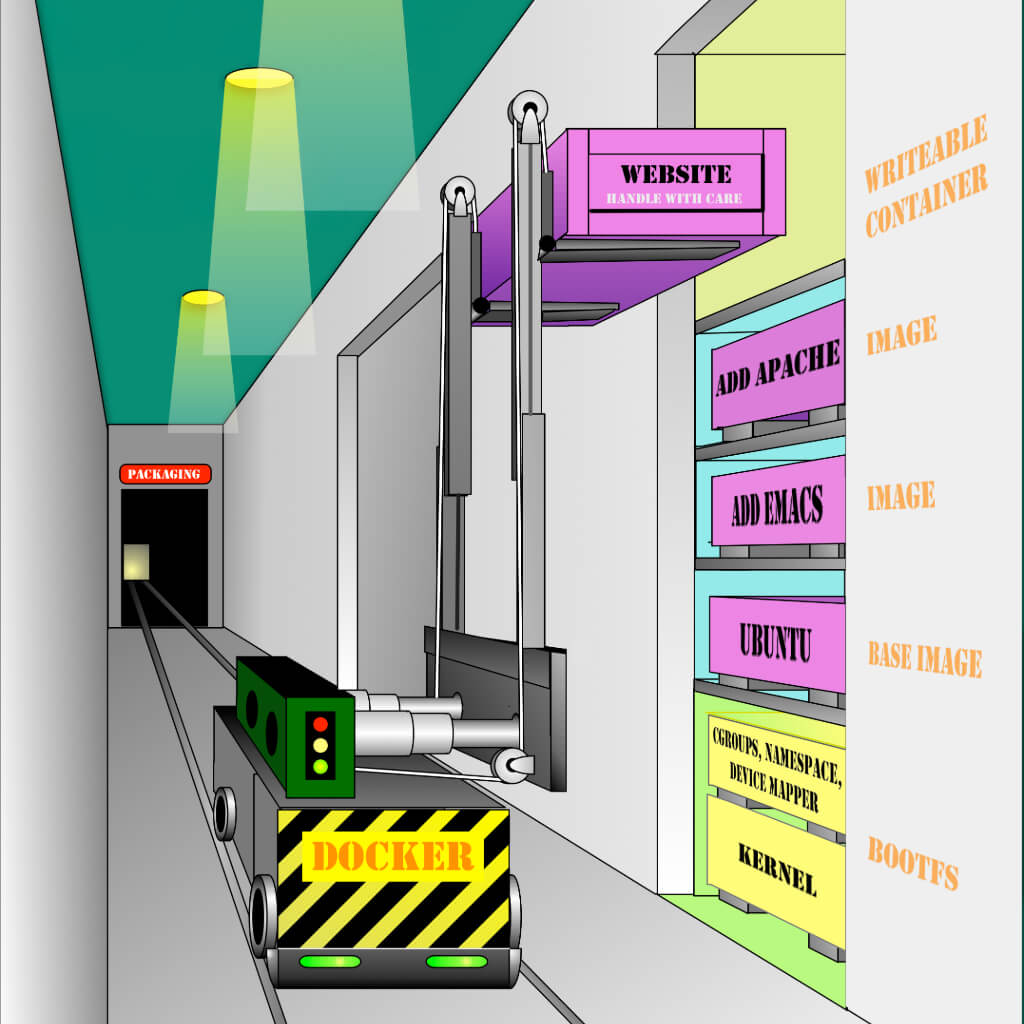
Source: The Docker Book | James Turnbull
What is Docker used for?
Docker is a powerful tool that provides isolation through containers.
Containers create isolated computing environments for testing and serve as consistent, reusable building blocks for services.
Here are some examples of how Docker can be used:
Testing Environment
- Developers can create, run, and share Docker containers in their local environments.
- Containers built in the development environment can be promoted to testing and later to production, ensuring consistency across stages.
Self-Hosting
Running independent services and applications
- Allows services and applications to run consistently across different environments.
- Ideal for service-oriented architectures and microservices-based deployments.
Application Development
High-Performance Deployments
Isolated testing in continuous integration (CI)
- Tools such as Jenkins CI use Docker to create isolated instances for running tests.
- Reduces the risk of interference among tests and improves CI-process reliability.
Building and testing complex architectures
- Allows complex applications to be replicated and tested on a local host before deployment to production environments.
Creating multi-user Platform-as-a-Service (PaaS) infrastructures
- Docker can provide the foundation for building platforms that support multiple users and services.
Lightweight, independent environments for learning and development
- Ideal for creating isolated sandboxes to:
- Test technologies such as Unix shells.
- Learn and teach programming languages.
- Run experiments without affecting the primary system.
SaaS (Software as a Service) applications
- Docker can be used to build and deploy SaaS applications, enabling efficient management and scalability.
High-performance and hyperscale deployments
- Containers are extremely lightweight, allowing multiple hosts to be configured quickly to meet large-scale demand.
How does Docker work?
Docker introduces an application-deployment mechanism based on a runtime environment that uses virtualized containers.
This mechanism provides an efficient workflow that facilitates moving code from the local development environment to testing and then to production.
Docker Architecture
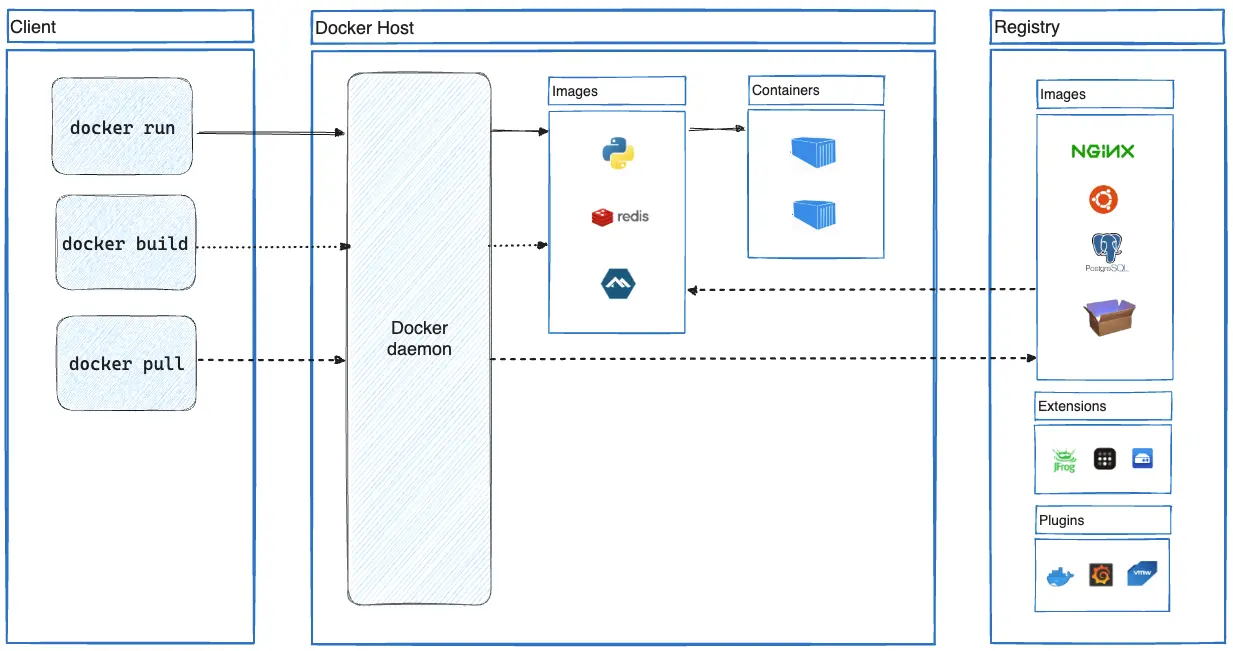
Docker uses a client-server architecture.
The Docker client communicates with the Docker server (daemon), which performs the more complex operations, such as creating, running, and distributing Docker containers.
The Docker client and daemon can run on the same system or remotely, with the client connecting to a daemon located on another machine.
Communication between client and daemon uses a REST API, which can operate through UNIX sockets or network interfaces.
Docker Client
The Docker client (docker) is the primary interface users employ to interact with Docker.
When you run commands such as docker run, the client sends those instructions to the daemon (dockerd), which executes them.
The Docker client uses the Docker API and can connect to multiple daemons simultaneously.
Docker Server (Daemon)
The Docker daemon (dockerd) listens for Docker API requests and manages Docker objects such as images, containers, networks, and volumes.
The daemon can also communicate with other daemons to manage Docker services in a distributed environment.
Docker Objects
When using Docker, you create and manipulate objects such as images, containers, networks, volumes, plugins, and others.
Images
An image is a read-only template containing instructions for creating a Docker container.
An image is usually based on another existing image with some customizations. For example, you can create an image based on the ubuntu image and add the Apache web server, the application you want to run, and the configuration required for it to work.
You can create your own images or use images made available by other users in public registries.
To build an image, you need to create a Dockerfile.
The Dockerfile uses a simple syntax to define the steps required to create and run the image.
Each instruction in the Dockerfile creates a layer in the image.
When the Dockerfile is modified and the image is rebuilt, only the changed layers are recreated. This makes images lightweight, compact, and fast, especially compared with other virtualization technologies.
Containers
A container is a runnable instance of an image.
You can create, start, stop, move, or delete a container using the Docker API or Docker CLI.
You can also connect a container to one or more networks, attach storage, or create a new image based on the container’s current state.
By default, containers are well isolated from one another and from the host system. The level of isolation for networks, storage, and other subsystems can be configured according to requirements.
A container is defined by its image and the configuration options provided when it is created or started.
When a container is removed, any state change not stored in a persistent volume is lost.
Registries
A Docker registry stores Docker images.
Docker Hub is the default public registry, available to any user, from which Docker retrieves images by default.
You can also configure and operate a private registry.
Commands such as docker pull or docker run cause Docker to download the required images from the configured registry.
Conversely, the docker push command allows you to upload your images to the configured registry.