
Learn how to diagnose and resolve logical and physical network problems, reduce downtime, and improve troubleshooting efficiency in IT infrastructure.
Check it out!
What Is Network Troubleshooting?
Network troubleshooting is the process of diagnosing and resolving problems that affect connectivity, performance, and the operation of network infrastructure. This process involves identifying the source of network problems, which may be found either in the physical layer (such as cabling and equipment) or in the logical layer (such as configurations and protocols).
Studies on network outages (network downtime) indicate that most downtime is actually spent on diagnosing the problem, while the repair itself consumes a much smaller portion of the total time. This happens because identifying the root cause of a failure can be complex, especially in environments with multiple technologies or vendors, such as hybrid and multi-cloud networks, as well as environments with numerous physical-layer problems.
In this article, we will cover network troubleshooting with a step-by-step guide to identify and solve the main day-to-day issues faced by professionals who work with IT management and governance.
[elementor-template id=”24446″]
What Is Network Downtime?
Network downtime is the period during which a communications network becomes inactive or unavailable to the users and services that depend on it.
Network outages can happen for several reasons, including hardware failures, software problems, planned or unplanned maintenance, configuration errors, failures in external services such as Internet providers or cloud services, and especially network infrastructure issues such as disorganized telecommunications cabinets and structured cabling problems.
Impacts of network downtime:
The impact of network downtime usually results in:
- Loss of connectivity between devices or systems.
- Interruption of communication and data transfer services.
- Reduced productivity for users and processes that depend on the network to operate.
Network repair time (MTTR – Mean Time to Repair)
The metric most often associated with network downtime is MTTR (Mean Time to Repair), which measures the average time required to diagnose and correct a failure.
Studies on network downtime show that most of the outage window is devoted to problem diagnosis, while the correction itself takes a much smaller share.
This happens because identifying the root cause of a network failure can be complex, especially in environments with multiple technologies or suppliers, such as hybrid or multi-cloud networks.
On average, it is estimated that 70% to 80% of the resolution time in network incidents is spent on diagnosis, while the actual repair accounts for only the remaining 20% to 30%.
The difficulty of locating the exact point of failure, the lack of visibility into parts of the network such as cloud or SaaS services, and the absence of integrated monitoring tools all contribute to this imbalance.
IT teams often end up constantly firefighting instead of working on proactive solutions or optimization initiatives.
This demonstrates the importance of using efficient monitoring and diagnostic tools, which can drastically reduce troubleshooting time and allow teams to restore service more quickly.
Network downtime or outages may be caused by problems in the logical network or in the physical network layer. We detail both below.
Logical Network Troubleshooting
The logical network includes all components that affect data traffic, such as router, switch and firewall configuration, IP addressing, routing, authentication, and network services.
Logical Network Diagnosis
1. Checking IP and Routing Settings
One of the most common issues in logical networks is related to IP addressing and routing. IP conflicts, incorrect router settings, and routing service failures can cause connectivity loss.
- Steps:
- Check whether devices have valid, non-conflicting IP addresses.
- Test connectivity with the
pingcommand to verify communication between devices. - Run
tracertortracerouteto track the path packets take to the destination and identify points of failure or delay.
- Tools:
- Angry IP Scanner: A fast network scanner that checks IP addresses and open ports, helping identify addressing conflicts.
- Traceroute: A standard tool for tracking packet paths across the network, useful for identifying routing problems.
2. DNS Testing
DNS resolution problems can prevent devices from communicating properly with servers or websites, even when the physical connection and IP addresses are correct.
- Steps:
- Use
nslookupordigto test whether DNS is resolving domain names correctly. - Check whether the configured DNS server is reachable and operating correctly.
- If the DNS servers are unavailable, try public DNS servers such as Google DNS (8.8.8.8).
- Use
- Tools:
- DNSstuff: An online tool that helps check and diagnose DNS problems.
- DNS Benchmark: Tests the performance and availability of configured DNS servers and offers recommendations to improve resolution time.
3. Checking Firewall Settings and Security Rules
A misconfigured firewall or overly restrictive security rules can block legitimate network traffic. Reviewing firewall rules and access control lists (ACLs) is essential in logical network troubleshooting.
- Steps:
- Review firewall rules to ensure essential traffic is allowed.
- Test different ports and protocols to verify whether the firewall or ACL is blocking required communication.
- Temporarily disable the firewall for testing only to see whether the connectivity issue persists.
- Tools:
- Wireshark: An advanced packet capture and analysis tool, excellent for identifying blocked packets or communication issues.
- Nmap: A port and service scanner that helps identify which ports are open or blocked by firewalls.
4. Testing Network Services: DHCP and Authentication
If the network is experiencing authentication problems or failures in dynamic IP address assignment, the DHCP server or other authentication services such as RADIUS may be responsible.
- Steps:
- Verify that the DHCP server is distributing IP addresses correctly. Use
ipconfig /renewon Windows ordhclienton Linux to force a request for a new IP address. - Test communication with the DHCP server to ensure it is active and working properly.
- Review authentication logs to identify login failures, authentication errors, or blocked devices.
- Verify that the DHCP server is distributing IP addresses correctly. Use
- Tools:
- IPconfig (Windows) and ifconfig (Linux): Command-line tools used to test and renew dynamic IP addresses assigned by DHCP.
- DHCP Server Analyzer: A tool for checking DHCP server status and monitoring address allocation.
5. Traffic Monitoring and Bottleneck Diagnosis
Network performance problems such as slowness or dropped connections may be caused by traffic congestion, poorly sized QoS (Quality of Service) policies, or overloaded devices.
- Steps:
- Use a monitoring tool to view traffic in real time and identify spikes or bottlenecks.
- Analyze network devices such as switches and routers to verify whether CPU or memory usage is overloaded.
- Review QoS policies to ensure critical traffic is being prioritized correctly.
- Tools:
- Zabbix: A network monitoring platform that allows real-time visualization of traffic, device performance, and services.
- PRTG Network Monitor: A tool that monitors bandwidth usage and network traffic, helping identify overload issues.
Physical Layer Troubleshooting: Identifying and Solving Problems
The physical layer of a network is made up of physical elements such as cables, connectors, cabinets, switches, and routers.
At first glance, because these are physical components, it may seem that the problems would be easier to identify. In practice, however, they are often even harder to analyze than logical network issues.
Statistically, most network failures originate in the physical layer and can be difficult to diagnose without the right expertise and equipment.
Physical Network Diagnosis
A good troubleshooting process at the physical layer starts with analyzing the most common signs of failure.
- Intermittent Connections: One of the main signs of problems in the physical layer is a connection that drops and comes back randomly. This may be caused by poor cable termination, damaged cables, or low-quality connectors.
- Low Performance: When data transfer rates are below expectations, the root cause may lie in cable quality or electromagnetic interference. Poorly designed networks or low-quality cabling can drastically limit performance.
- Packet Loss and High Latency: These symptoms may indicate electromagnetic interference (EMI), cable deterioration, or problems in the electrical infrastructure. Cabling that does not follow good installation practices often suffers from these issues.
- Network Equipment Failures: Overloaded, poorly installed, or poorly cooled switches and routers can cause interruptions across the network and directly affect data integrity.
Physical Layer Troubleshooting: What Can the IT Team Do?
When issues arise in the physical network layer, it is common for the IT team to be called in to solve them. However, troubleshooting activities can overload the IT team and pull them away from more strategic and critical tasks.
For this reason, some troubleshooting steps can be carried out quickly by the team itself, leaving the more complex cases to specialized professionals with the proper tools.
Here are some actions the IT team can perform quickly without compromising the time required for more critical responsibilities:
Basic Visual Inspection
- Cable condition: The IT team can visually inspect the racks to identify cables that are worn, bent, or visibly damaged.
- Loose connectors: Check whether RJ45 connectors are properly connected to devices and patch panels. Sometimes a simple reconnection solves temporary connectivity issues.
Basic Connection Tests
- Ping and tracert: Using simple commands such as ping and tracert can help determine whether a given device is able to communicate with others on the network, indicating the likely location of the problem.
- Switch port swap: If a specific device is experiencing connectivity problems, testing a different switch port can help identify whether the failure is in the hardware.
Check Equipment Power Conditions
- Restart switches and routers: In temporary failure scenarios, restarting network devices can resolve occasional issues without requiring deeper intervention.
Complex Services: Diagnosis and Specialized Solutions
While the IT team can perform some basic checks in the physical layer, solving more complex issues requires the right services and tools.
The services below are essential for accurate diagnosis and proper correction of these problems, ensuring that the network operates efficiently and stably.
Below, we detail the main activities that require expertise and specific equipment and that may be carried out as part of a diagnostic consultancy or scheduled maintenance engagement.
Network Point Mapping
Mapping and Identification of Network Points
Objective: Ensure that all network points are properly identified, both in the rack and at the workstation.
A network without identification makes diagnosis almost impossible, because without knowing which user network point corresponds to which rack point, it becomes very difficult to test ports or enable and disable outlets.
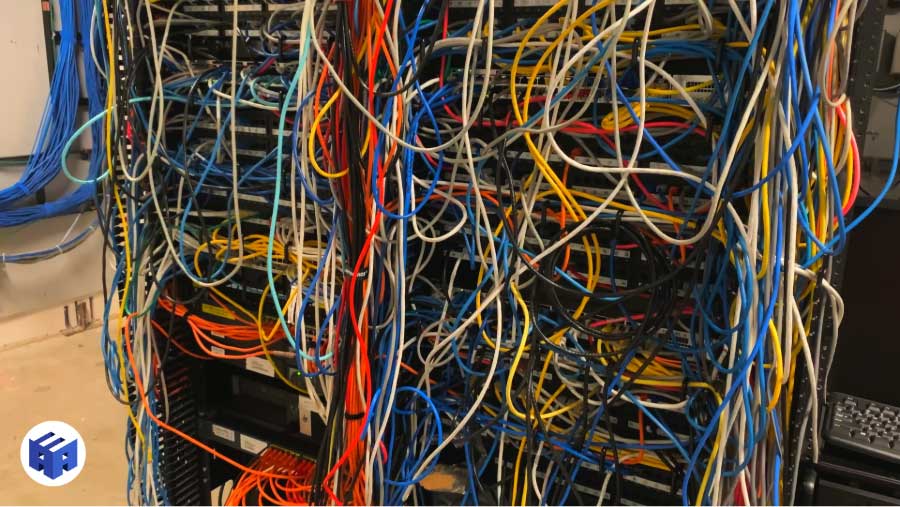
Activity:
- Perform a complete rack inspection, checking the connection of every cable.
- Visually identify and document the corresponding rack and workstation points.
- Use a continuity tester or cable identifier to confirm the correct correspondence between the rack point and the workstation point.
- Label all cables and network points to ensure clear identification for future maintenance or expansions.
For cases like this, we recommend hiring rack organization services.
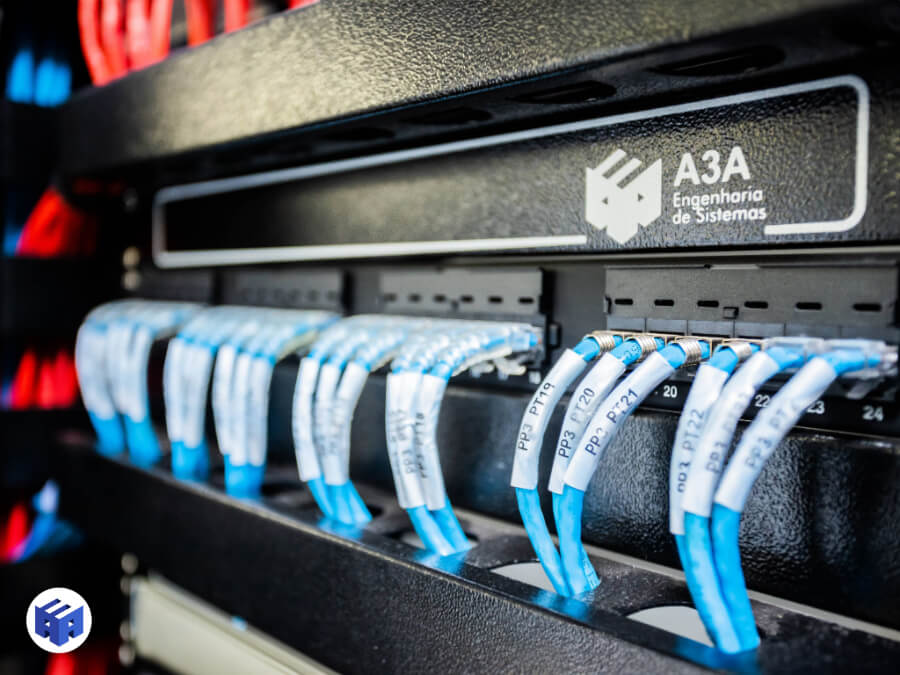
A3A Engenharia de Sistemas archive
Need to organize your network racks? Contact our Engineering Department.
Continuity and Cable Integrity Testing
- Objective: Verify that all network cables have no continuity failures, breaks, or faults.
- Activity:
- Use cable testers to verify continuity and identify possible breaks or poor terminations.
- Inspect RJ45 connectors and re-terminate defective endings.
- Record the results of each test for future consultation and diagnostics.
This stage of network troubleshooting can be performed during rack organization activities.
Structured Cabling Certification
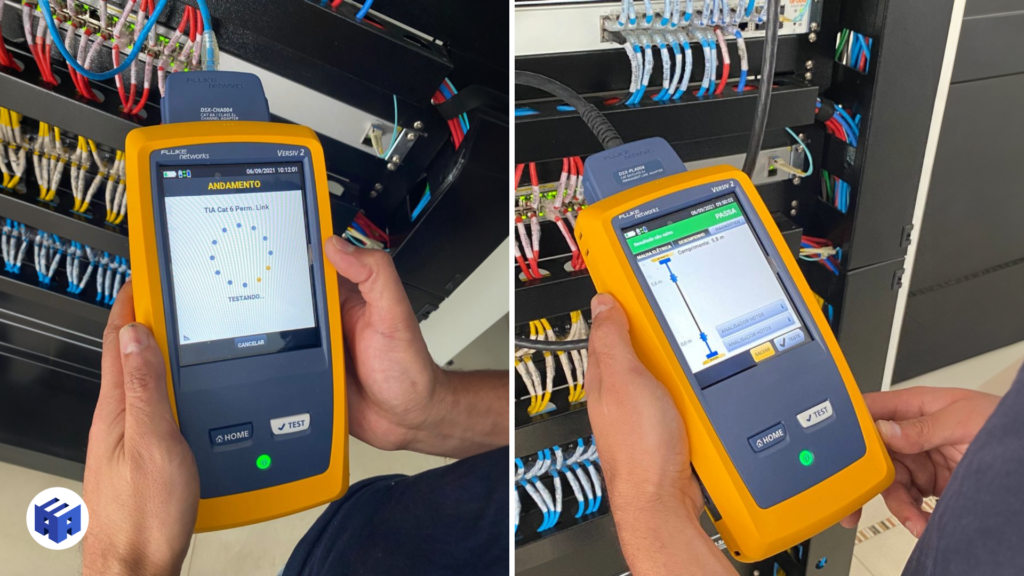
Archive: A3A Engenharia de Sistemas
The certification of network points is important for diagnosing all kinds of problems related to structured cabling by identifying issues through formal reporting.
These structured cabling tests ensure the health of the physical network because they certify that network points meet the required standards for the desired data traffic and analyze possible electromagnetic interference that may cause latency or even network unavailability.
Electromagnetic Interference (EMI) Verification
- Objective: Identify and mitigate possible sources of electromagnetic interference that may impair network performance.
- Activity:
- Use measuring equipment to identify interference.
- Reposition cables that are too close to EMI sources, such as power cables or electronic equipment.
- Document the highest-risk interference areas and adopt preventive measures.
End-to-End Network Point Certification
- Objective: Certify that all network points are within the technical parameters required to support the desired data rate.
- Activity:
- Use a cable certifier to run performance tests, including attenuation, return loss, and crosstalk parameters.
- Generate certification reports for each network point.
- Record and archive the reports to ensure traceability and compliance.
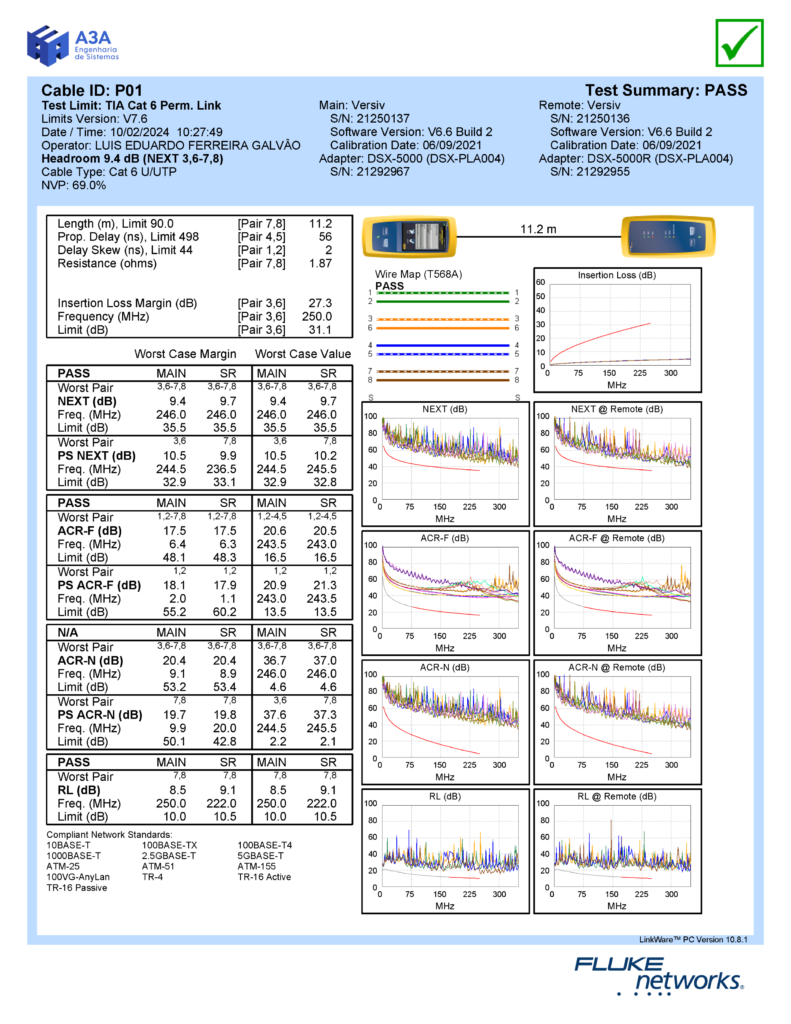
A3A Engenharia de Sistemas archive
To perform a complete diagnosis of your structured cabling, we recommend the Network Certification service.
Talk to our Engineering Department and schedule a complete test for your network.
Preventive Maintenance and Continuous Monitoring
- Objective: Ensure proper long-term network operation.
- Activity:
- Implement continuous monitoring solutions for the physical layer, identifying potential failures before they affect network performance.
- Schedule periodic maintenance to inspect cables, connectors, and network equipment.

Final Considerations
Network troubleshooting, especially in the physical layer, is crucial to ensuring the stability and performance of any IT infrastructure. Problems such as damaged cables, electromagnetic interference, and poor connections are often the main causes of connectivity and performance failures. Resolving these failures efficiently is essential to reducing MTTR (Mean Time to Repair).
Studies show that in many network downtime events, about 80% of the outage time is spent diagnosing the problem, while only 20% is dedicated to the actual repair. This highlights the importance of having an agile diagnostic process and a well-structured plan to minimize the impact of failures on operations.
With a proactive approach involving proper mapping, cable certification, and continuous monitoring, it is possible to significantly reduce diagnosis time and, consequently, MTTR, allowing the network to return to full operation faster.
The use of advanced diagnostic tools such as spectrum analyzers and cable testers, combined with the expertise of qualified professionals, is essential for quickly identifying the origin of problems and reducing response time.
In addition, maintaining a well-designed network and performing regular preventive maintenance not only reduces the frequency of failures, but also directly contributes to optimizing MTTR, shortening outage durations and improving the overall performance of the IT infrastructure.
Finally, partnering with a company specialized in network diagnostics and maintenance can make the difference between a robust infrastructure and a network vulnerable to recurring failures. Ensuring that the network is well designed, installed, and maintained is essential for the success of any organization’s operations.
Contact A3A Engenharia de Sistemas and hire a technical consulting service.

Normative References
- ANSI/TIA-568 – Telecommunications Infrastructure Standards for Commercial Buildings
- ISO/IEC 11801 – Information Technology – Generic Cabling for Customer Premises
- IEEE 802.3 – IEEE Standard for Ethernet
- ANSI/TIA-606 – Administration Standard for the Telecommunications Infrastructure of Commercial Buildings
- TIA-942 – Telecommunications Infrastructure Standard for Data Centers
- IEEE 802.11 – IEEE Standard for Wireless LANs (Wi-Fi)
- TIA-1005-A – Telecommunications Infrastructure Standard for Industrial Premises
- NBR 14565 – Cabling for Commercial Buildings
- IEC 61000 – Electromagnetic Compatibility (EMC)
Acknowledgements
Thank you for taking the time to read this article. We hope the information presented here has been useful and clear.
If you have questions or need additional assistance, do not hesitate to get in touch.
A3A Engenharia is always available to help and provide the best network and infrastructure solutions.