Network Ports are essential components in communication between processes, whether locally or over long-distance networks, such as the internet. In this article, we will explore the fundamental concepts that underpin the functioning of network ports, covering everything from process management and inter-process communication to the practical implementation of servers and a detailed explanation of how […]
Check it out!
Network Ports are essential components in communication between processes, whether locally or over long-distance networks, such as the internet.
In this article, we will explore the fundamental concepts that underpin the functioning of network ports, covering everything from process management and inter-process communication to the practical implementation of servers and a detailed explanation of how ports work.
Check it out!
[elementor-template id=”24446″]
How Does an Operating System Manage Processes?
To understand how network ports work, their purpose and why they exist, it is necessary to understand how an operating system manages processes and facilitates communication between them.
An operating system (OS) is responsible for managing processes, which are basically programs in execution. Each process receives a unique identifier called a PID (Process ID), and the operating system controls the resources each process uses, including memory.
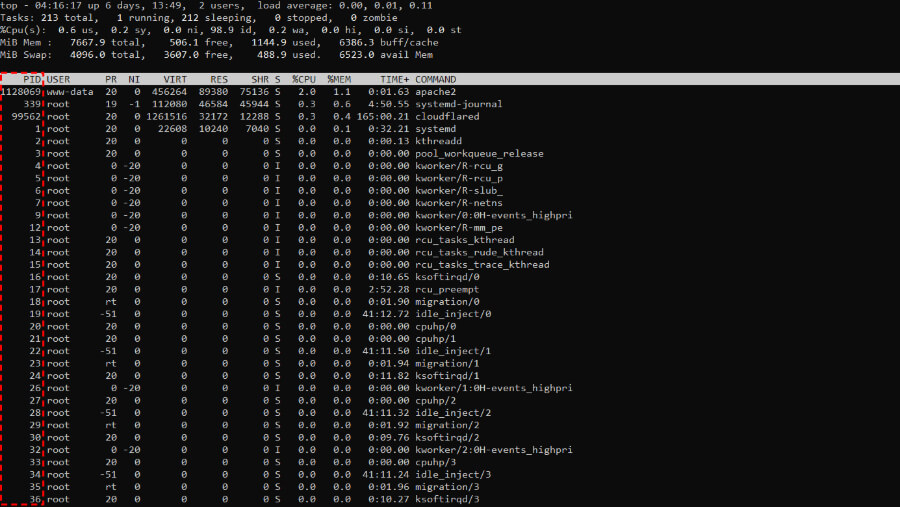
A fundamental concept for process management is memory isolation. Isolation ensures that each process operates in a separate memory space, preventing one process from directly interfering with the operation of another.
This separation is vital for data integrity and for the stability of the system as a whole, preventing failures in one process from affecting others in execution.
Since processes are isolated, they cannot simply access another process’s memory. For two processes to share information, they need Inter-Process Communication (Inter-Process Communication) mechanisms.
Inter-Process Communication (IPC)
- Pipes;
- Files;
- Streams and Buffers;
Network Communication
In the 1960s, the creation of computer networks radically changed computing. Instead of isolated systems, networks allowed different computers to run processes in parallel and, more importantly, for these processes to communicate.
This new paradigm required a way for a process on one computer to communicate with a process on another, in a structured and reliable manner.
To facilitate this communication, the concept of sockets emerged, offering semantics similar to file handling. Just as we manipulate files with operations like “read” and “write”, sockets allow reading and writing data in bit streams between distinct systems.
BSD Sockets
In 1983, the introduction of BSD Sockets (Berkeley Software Distribution Sockets) in the UNIX BSD 4.2 system standardized inter-process communication over networks, becoming a widely adopted model.
BSD Sockets, or POSIX sockets, define a set of APIs and protocols that form the foundation of a UNIX system, providing an interface for establishing network connections between processes on different computers.
These sockets facilitate the fragmentation of data into packets, enabling their transfer across different types of networks, whether a local network or the internet. The operating system is responsible for creating these packets and transporting them through a physical network (fiber optic, copper cable, wireless networks, etc.), converting data into blocks of bits, whether on hard drives (HDDs) or in network packets.
In simplified terms, sockets are a generalization of file primitives. On Linux, for example, the system provides the program with a file descriptor that can represent both a local file and a network connection (a socket).
This descriptor is a “black box” that allows the process to receive and send bits, acting as an intermediary between the operating system and the hardware.
Thus, regardless of whether it is a file or a network socket, the program interacts with the operating system in the same way: requesting the reading or writing of data.
Connection Flow
The process for establishing a socket connection follows a sequence of steps:
- Bind: A program requests the operating system to perform a “bind” between an IP address and a port number (16 bits). This process is like a “registration”, where the operating system assigns a unique identifier (PID) to the process and associates it with a specific port, ensuring that no other process can use that same port.
- Listen: After the bind, the process enters a listening state, waiting for a connection. It is similar to opening a file and waiting for incoming data. In the case of a web server, for example, it listens for connections on port 80 (HTTP) or 443 (HTTPS), waiting for a client request.
- Accept: When a client attempts to connect, the operating system checks who is listening on the specified port and delivers the data to the correct process. At this point, the receiving program can decide to accept or reject the connection.
This cycle of bind, listen and accept is the foundation of network communication between processes, creating a “connection” through which data flows bidirectionally.
After the connection is established, the processes involved (client and server) need to exchange information in a common language, or protocol, that defines the allowed commands and data. For example, a database server expects specific commands that follow the SQL protocol, while a web server expects HTTP commands such as GET and POST.
Each protocol is like a “pin pattern” on a plug. If a browser tries to communicate with a SQL server, it will not work, because the commands do not “fit”. This standardization of protocols ensures that each application can communicate correctly, as long as the protocol is understood by both parties.
What is a Network Port?
A network port is a numerical identifier that, together with the IP address, allows the operating system to direct data traffic to the correct process.
Each port is composed of a 16-bit number, enabling a range of 65,536 ports (0 to 65,535).
Ports are classified into different ranges:
System Ports (0 – 1023)
These ports, also known as Well-Known Ports, are reserved for standard services that all systems recognize and for which they have clear expectations of functionality.
They require administrator permissions on UNIX systems, as they support critical services, being fundamental to internet infrastructure.
These ports are fundamental for maintaining network stability and security, and the requirement for administrative permissions for their use prevents ordinary programs or unprivileged users from interfering with these essential services.
Registered Ports (1024 – 49151)
Registered Ports are reserved for services and applications that do not require administrative permissions, but that need a fixed port to function correctly. They are widely used by specific company or development applications and services, allowing developers to configure applications without needing elevated privileges.
These ports can be used by any ordinary user, and their wide range avoids conflicts, allowing many different applications to coexist on a single system without needing to share ports.
Dynamic Ports (49152 – 65535)
Dynamic Ports, also known as ephemeral or private ports, are reserved for temporary and dynamic connections, where the operating system automatically chooses the first available port for communication. These ports are used mainly in applications that require fast and temporary connections, such as:
- Video Calls: Programs such as Zoom and Skype use these ports to establish temporary connections between devices.
- Multiplayer Games: Online games use these ports to create temporary communication sessions between players.
- Web Session Data Transfer: Web browsers open ephemeral connections to transfer data when connecting to servers.
When an application initiates a temporary connection, the operating system chooses a free port within this range and uses it for the duration of the session. Upon completion, the port is released, allowing other applications to reuse this resource. This dynamic avoids the need for a fixed bind and increases the flexibility of temporary connections.
Port Forwarding
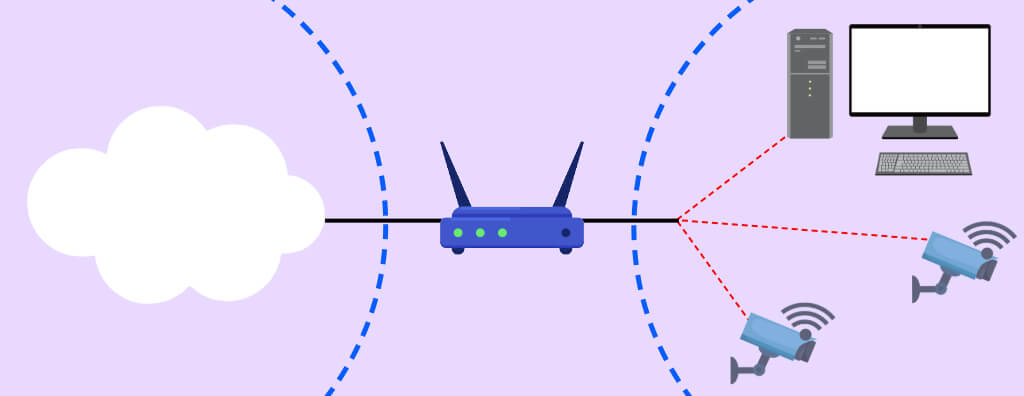
When a data packet arrives at a router on the network, it has a destination IP address and port.
Port forwarding instructs the router to forward traffic destined for a specific port to an IP address and port within the local network.
In this way, external devices can communicate directly with internal devices, even if those internal devices are on a private network.
For example:
- If you want to access a security camera on your local network (internal IP 192.168.1.50) through port 8080, you can configure the router to forward port 8080 from the public IP to port 8080 of that specific internal IP. So, by accessing http://[your-public-IP]:8080, the router directs the traffic to the internal camera.
Port forwarding is configured on the router or network firewall. The settings generally include:
- External Port: The port on which the router receives external traffic.
- Internal IP Address: The IP of the device on the local network to which the traffic should be forwarded.
- Internal Port: The port of the internal device that will receive the traffic.
When the router receives a request on the configured external port, it automatically forwards it to the defined internal IP address and port, establishing the connection with the desired device.
Types of Port Forwarding
Static Port Forwarding
In static port forwarding, a specific external port is always forwarded to a specific internal port at a fixed IP. It is ideal for servers that need to be consistently accessible, such as web or FTP servers.
Dynamic Port Forwarding (PAT)
Port Address Translation (PAT), or dynamic port forwarding, allows multiple internal ports to share a single external port or a set of ports. PAT is widely used to allocate temporary ports to devices and applications, allowing greater control over traffic.
Port Range Forwarding
This type of forwarding allows a range of ports to be forwarded, which is useful for applications that use multiple ports simultaneously, such as multiplayer games and VoIP services.
Dynamic DNS (DDNS)
Many home and commercial internet connections use a dynamic IP, meaning the public IP address can change at any time, depending on the internet provider.
This can be problematic for port forwarding and remote access, as external devices need to know the exact IP address to connect to the local network.
With a dynamic IP, remotely accessing a device or service becomes inconsistent, as the address can change unexpectedly.
DDNS solves this problem by associating a domain name with the dynamic IP and automatically updating the IP address when it changes.
This way, you can access internal devices (such as security cameras, servers, or IoT applications) always using the same domain name, regardless of the IP.
Data Security
Forwarding ports can create vulnerabilities, as it opens a direct channel to internal devices, which can be exploited by attackers.
Use of Strong Passwords
Always configure secure passwords for remotely accessible devices.
Two-Factor Authentication
Firewall and Access Control
Use firewalls to limit access to specific ports.
Virtual Private Network (VPN)
Instead of directly exposing a port on the public network, use a VPN to access the local network securely, creating an encrypted tunnel that protects traffic.