
Docker is an open source platform that uses container technology to simplify the development, deployment, and execution of applications in isolated computing environments. In this article, we will understand what a container is, the main concepts related to Docker, and the impact this platform has on software development and system hosting. Check it out! What […]
Check it out!
Docker is an open source platform that uses container technology to simplify the development, deployment, and execution of applications in isolated computing environments.
In this article, we will understand what a container is, the main concepts related to Docker, and the impact this platform has on software development and system hosting.
Check it out!
[elementor-template id=”24446″]
What is a Container?
A Container is a form of virtualization at the operating system level.
Unlike virtualization by a hypervisor (e.g., VMware and VirtualBox), which creates complete virtual machines with entirely independent operating systems, containers share the operating system’s kernel from the host, allowing multiple isolated user-space instances to run in the same environment.
Platforms like Docker drastically reduce resource overhead and can accelerate boot times compared to virtual machines.
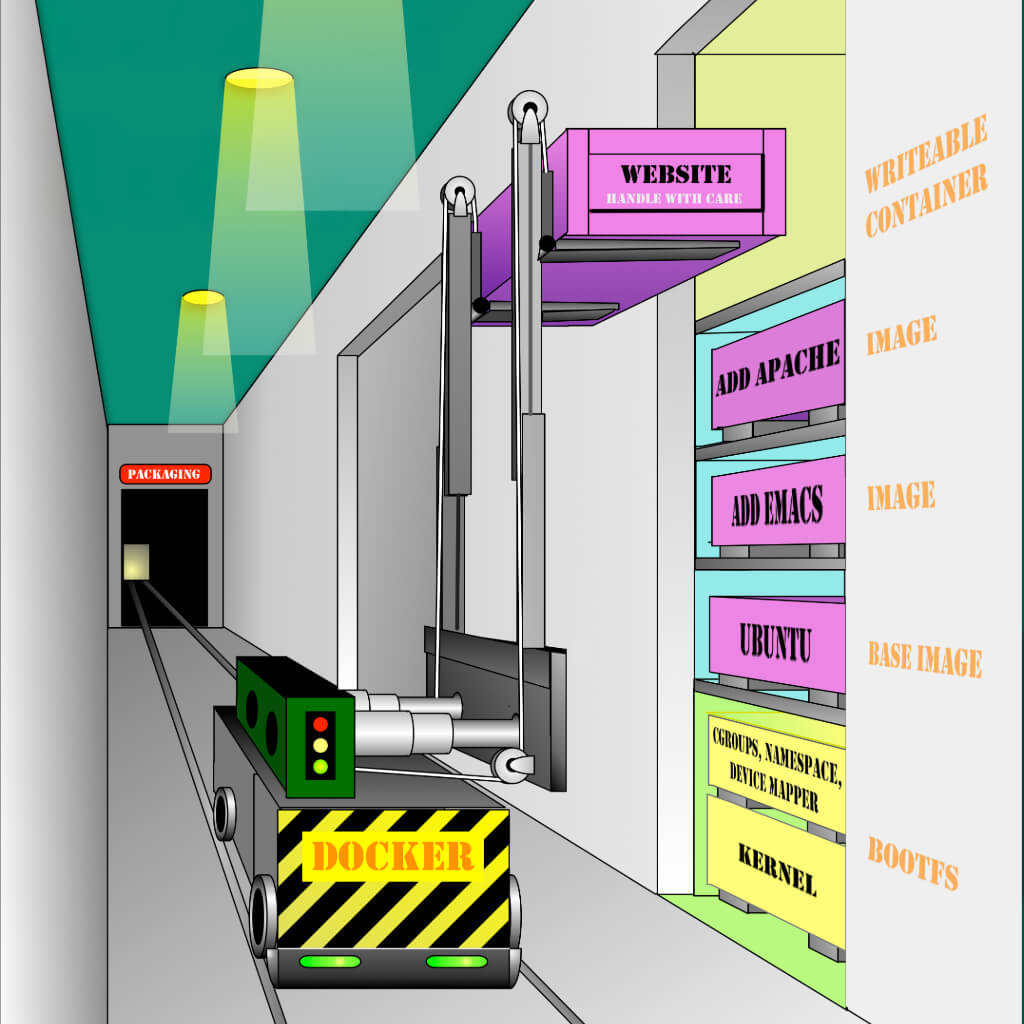
Source: The Docker Book | James Turnbull
What is Docker used for?
Docker is a powerful tool that provides isolation through containers.
Containers create isolated computing environments for testing and serve as consistent, reusable “building blocks” for services.
Here are some examples of how Docker can be used:
Testing Environment
- Developers can build, run, and share Docker containers in their local environments.
- Containers built in the development environment can be promoted to testing and subsequently to production, ensuring consistency across stages.
Self-Hosting
Running independent services and applications
- Allows running services and applications consistently across different environments.
- Ideal for service-oriented architectures and microservices-based deployments.
Application Development
High-Performance Deployments
Isolated testing in Continuous Integration (CI)
- Tools like Jenkins CI use Docker to create isolated instances to run tests.
- Reduces the risk of interference between tests and improves the reliability of the CI process.
Building and testing complex architectures
- Allows replicating and testing complex applications on a local host before deploying them to production environments.
Creation of multi-user infrastructure in Platform-as-a-Service (PaaS) style
- Docker can be the foundation for building platforms that support multiple users and services.
Lightweight and independent environments for learning and development
- Ideal for creating isolated sandboxes to:
- Test technologies like Unix shells.
- Learn and teach programming languages.
- Perform experiments without impacting the main system.
SaaS (Software as a Service) Applications
- Docker can be used to build and deploy SaaS applications, allowing for efficient management and scalability.
High-performance and hyper-scalable deployments
- Containers are extremely lightweight, allowing multiple hosts to be set up quickly to meet large-scale demands.
How does Docker work?
Docker introduces an application deployment mechanism on top of an execution environment based on virtualized containers.
This mechanism provides an efficient workflow that facilitates the transition of code from the local development environment to testing environments and to production.
Docker Architecture
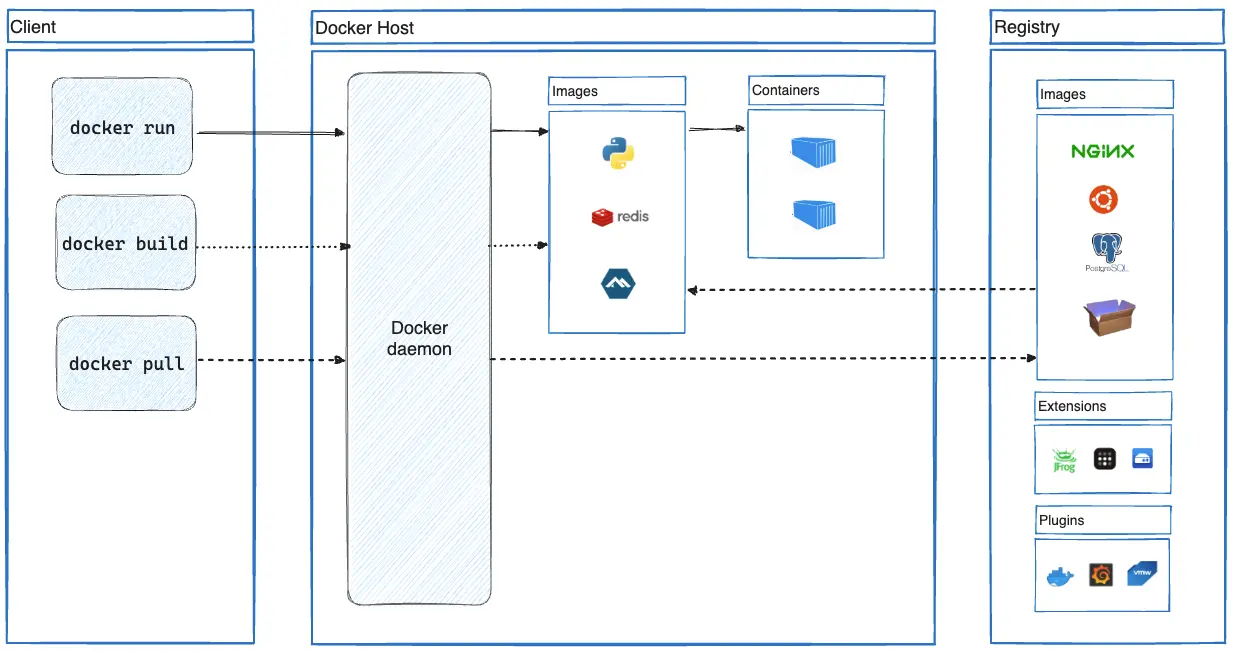
Docker uses a client-server architecture.
The Docker client communicates with the Docker daemon (server), which is responsible for carrying out the heavy lifting of building, running, and distributing Docker containers.
The Docker client and daemon can run on the same system, or you can connect a Docker client to a remote Docker daemon.
The communication between the client and daemon uses a REST API, over UNIX sockets or a network interface.
Docker Client
The Docker client (docker) is the primary interface used by many Docker users to interact with Docker.
When you use commands such as docker run, the client sends these commands to the daemon (dockerd), which carries them out.
The Docker client uses the Docker API and can communicate with more than one daemon simultaneously.
Docker Server (Daemon)
The Docker daemon (dockerd) listens for Docker API requests and manages Docker objects such as images, containers, networks, and volumes.
In addition, a daemon can also communicate with other daemons to manage Docker services in a distributed environment.
Docker Objects
When you use Docker, you are creating and using objects like images, containers, networks, volumes, plugins, and other objects.
Images
An image is a read-only template with instructions for creating a Docker container.
Often, an image is based on another image, with some additional customization. For example, you may build an image based on the ubuntu image, adding the Apache web server, your application, and the configuration details needed to make it run.
You might create your own images or you might only use those created by others and published in a public registry.
To build your own image, you create a Dockerfile.
The Dockerfile uses a simple syntax for defining the steps needed to create the image and run it.
Each instruction in a Dockerfile creates a layer in the image.
When you change the Dockerfile and rebuild the image, only those layers which have changed are rebuilt. This makes images lightweight, small, and fast, especially when compared to other virtualization technologies.
Containers
A container is a runnable instance of an image.
You can create, start, stop, move, or delete a container using the Docker API or Docker CLI.
You can connect a container to one or more networks, attach storage to it, or even create a new image based on its current state.
By default, a container is relatively well isolated from other containers and its host machine. You can control how isolated a container’s network, storage, or other underlying subsystems are from other containers or the host machine.
A container is defined by its image as well as any configuration options you provide to it when you create or start it.
When a container is removed, any changes to its state that are not stored in persistent storage disappear.
Registries
A Docker registry stores Docker images.
Docker Hub is a public registry that anyone can use, and Docker is configured to look for images on Docker Hub by default.
You can even run your own private registry.
When you use the docker pull or docker run commands, the required images are pulled from your configured registry.
When you use the docker push command, your image is pushed to your configured registry.