Virtualization is a fundamental concept in modern computing, and the hypervisor is one of its essential components for creating and managing virtual machines.
Check it out!
Virtualization is a fundamental concept in modern computing, providing greater flexibility, efficiency, and scalability for IT infrastructure.
One of the essential components in this process is the hypervisor, a software layer that enables the creation and management of virtual machines.
In this article, we will explore the concept of a hypervisor, its role, the differences between the existing types, and how it differs from a virtual machine.
Check it out!
[elementor-template id=”24446″]
What Is Virtualization?
Virtualization is a technique that makes it possible to create virtual versions of physical computing components, including:
- Computer hardware
- Networks
- Processors (CPU)
- RAM memory
- Storage
- Operating systems
- Peripheral devices
Virtualization is widely used to optimize the use of computing resources, reduce operating costs, and simplify the deployment and management of infrastructures.
What Is a Hypervisor?
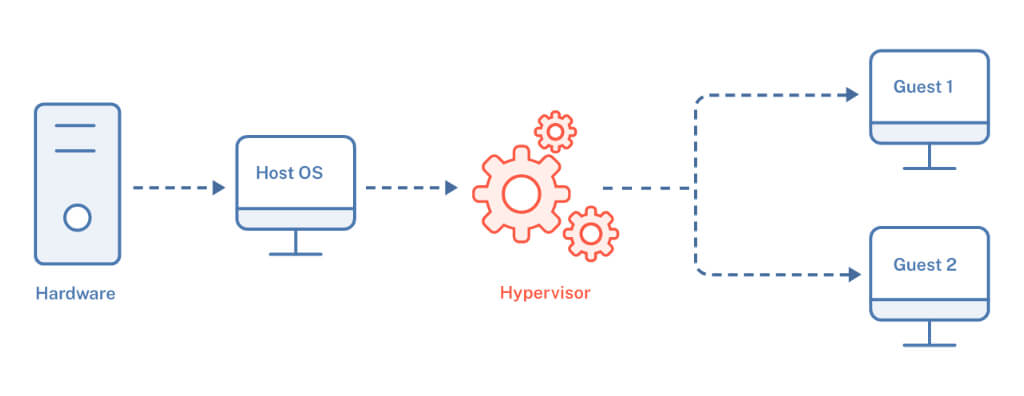
The hypervisor is the software responsible for creating and managing virtual machines, allowing a single physical hardware platform to run multiple operating systems simultaneously.
It acts as an abstraction layer between the physical hardware, known as the host, and the virtual machines, known as guests, providing isolated execution of different environments.
Difference Between a Hypervisor and a Virtual Machine
A virtual machine (VM) is a simulation of a real computer, using virtual resources such as CPU, memory, storage, and networking. A VM can run any operating system compatible with the underlying architecture and can be managed by the hypervisor.
The hypervisor, on the other hand, is the software that makes the creation and operation of VMs possible, controlling the allocation of resources among them and ensuring that they operate in isolation.
Differences Between Hypervisors and Dual Boot
Unlike dual boot, which requires the selection of one operating system during computer startup, virtualization allows multiple operating systems to run simultaneously on the same physical hardware. This is essential for testing, development, and server deployment.
With hypervisors, it is possible to create isolated environments for different systems, facilitating workload segmentation and the execution of diverse applications.
Types of Hypervisor
Hypervisors are classified into two main types:
Type 1 Hypervisor (Bare Metal)
The type 1 hypervisor runs directly on the server hardware, without the need for an underlying operating system. It offers greater efficiency and performance because it manages physical resources directly.
- Runs directly on hardware
- Higher performance and security
- Common use in data center and cloud computing environments
Examples:
- VMware ESXi
- Microsoft Hyper-V in bare-metal mode
- Citrix XenServer
- KVM (Kernel-based Virtual Machine)
Type 2 Hypervisor (Hosted)
The type 2 hypervisor is installed on top of a conventional operating system such as Windows, Linux, or macOS and works as an application.
- Requires an underlying operating system
- Lower performance compared with type 1
- Easier to configure and use
- Ideal for development and testing
Examples:
- Oracle VirtualBox
- VMware Workstation
- Parallels Desktop
Unlike dual boot, which requires choosing an operating system at startup, virtualization allows multiple operating systems to run simultaneously on the same physical hardware. This is essential for testing, development, and server deployment.
With hypervisors, it is possible to create isolated environments for different systems, facilitating workload segmentation and the execution of diverse applications.
Benefits of Virtualization with Hypervisors
Using hypervisors offers several advantages, including:
- Better hardware utilization: a single server can host several VMs.
- Energy and space savings: lower need for physical servers.
- Greater flexibility: it is easier to create, copy, move, and delete virtual machines.
- Isolation between environments: each VM operates independently, increasing security and stability.
- Agility in testing and deployment: ideal for development, validation, and rapid provisioning scenarios.
Main Use Cases
Hypervisors are widely used in a variety of scenarios, such as:
- Data centers and cloud computing environments
- Software development and testing laboratories
- Server consolidation projects
- Disaster recovery and business continuity strategies
- Educational and training environments for infrastructure and systems
Conclusion
The hypervisor is an essential element of modern virtualization, enabling multiple operating systems and workloads to run efficiently on the same physical infrastructure. Understanding its types, functions, and differences in relation to virtual machines is fundamental for anyone working with servers, cloud computing, and IT infrastructure.
By properly choosing between type 1 and type 2 hypervisors and aligning that choice with the needs of the environment, it is possible to obtain gains in performance, flexibility, and operational control. In increasingly dynamic IT environments, virtualization supported by hypervisors remains one of the pillars of scalability and efficiency.