Virtualization is a core concept in modern computing. Learn what a hypervisor is, how it manages virtual machines, and the differences between Type 1 and Type 2 hypervisors.
Check it out!
Virtualization is a fundamental concept in modern computing, providing greater flexibility, efficiency, and scalability for IT infrastructure.
One of the essential components in this process is the hypervisor, software that enables the creation and management of virtual machines (VMs).
In this article, we explore the concept of a hypervisor, its function, the differences between the existing types, and how it differs from a virtual machine.
Read on.
[elementor-template id=”24446″]
What Is Virtualization?
Virtualization is a technique that makes it possible to create virtual versions of physical computing components, including:
- Computer hardware
- Networks
- Processors (CPU)
- RAM
- Storage
- Operating systems
- Peripheral devices
Virtualization is widely used to optimize computing-resource utilization, reduce operating costs, and simplify infrastructure deployment and management.
What Is a Hypervisor?
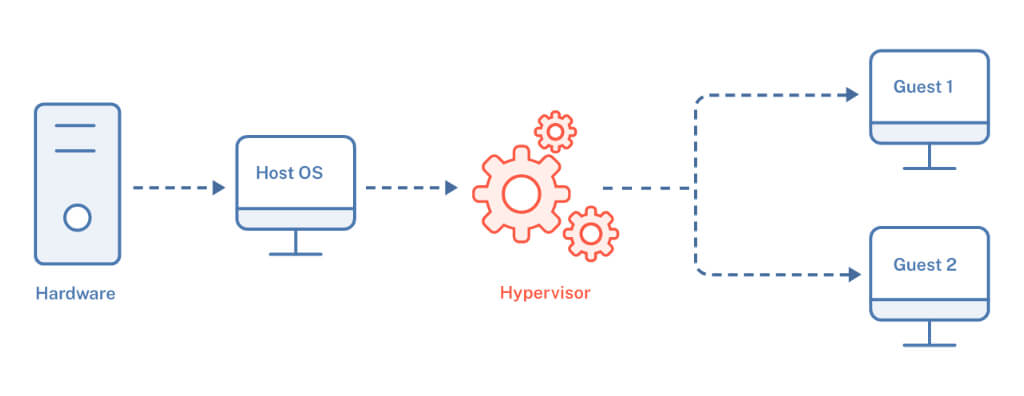
A hypervisor is the software responsible for creating and managing virtual machines, allowing a single physical hardware platform to run multiple operating systems simultaneously.
It acts as an abstraction layer between the physical hardware (host) and the virtual machines (guests), providing isolated execution for different environments.
Difference Between a Hypervisor and a Virtual Machine
A virtual machine (VM) is a simulation of a real computer, using virtual resources such as CPU, memory, storage, and networking. A VM can run any operating system compatible with the underlying architecture and is managed by the hypervisor.
The hypervisor, by contrast, is the software that enables the creation and operation of VMs, controls the allocation of resources among them, and ensures that they run in isolation.
Hypervisors vs. Dual Boot
Unlike dual boot, which requires selecting an operating system when the computer starts, virtualization allows multiple operating systems to run simultaneously on the same physical hardware. This is valuable for testing, development, and server deployment.
With hypervisors, isolated environments can be created for different systems, making it easier to segment workloads and run diverse applications.
Types of Hypervisor
Hypervisors are classified into two main types:
Type 1 Hypervisor (Bare Metal)
A Type 1 hypervisor runs directly on server hardware without requiring an underlying operating system. It generally offers greater efficiency and performance because it manages physical resources directly.
- Runs directly on the hardware
- Higher performance and security
- Common in data center and cloud-computing environments
Examples:
- VMware ESXi
- Microsoft Hyper-V (bare-metal mode)
- Citrix XenServer
- KVM (Kernel-based Virtual Machine)
Type 2 Hypervisor (Hosted)
A Type 2 hypervisor is installed on a conventional operating system (Windows, Linux, or macOS) and runs as an application.
- Requires an underlying operating system
- Lower performance compared with Type 1
- Easier to configure and use
- Well suited to development and testing
Examples:
- Oracle VirtualBox
- VMware Workstation
- Parallels Desktop
Unlike dual boot, which requires selecting an operating system at startup, virtualization allows multiple operating systems to run simultaneously on the same physical hardware. This is useful for testing, development, and server deployment.
Hypervisors make it possible to create isolated environments for different systems, helping segment workloads and run diverse applications.
Benefits of Virtualization with Hypervisors
Using hypervisors offers several advantages, including:
- Better hardware utilization: one physical server can host multiple VMs.
- Energy and space savings: fewer physical servers are required.
- Easier deployment of new systems: virtual machines can be created quickly.
- Scalability: infrastructure can be expanded without immediately adding new hardware.
- Greater availability and redundancy: support for techniques such as Live Migration and High Availability.
Application Examples
Hypervisors are used in a range of scenarios, including:
- Data centers and cloud providers (AWS, Azure, and Google Cloud use customized virtualization technologies).
- Development and test environments, allowing different systems to run simultaneously.
- Corporate IT infrastructures, reducing costs and optimizing resources.
- CI/CD and DevOps, using virtualization for continuous-integration environments.
Conclusion
The hypervisor plays a central role in system virtualization by enabling multiple virtual machines to run on a single hardware platform. It differs from the virtual machine itself because it is the software responsible for creating and managing VMs. Choosing between a Type 1 and Type 2 hypervisor depends on the environment and on performance and security requirements.
As technology advances, virtualization continues to evolve and remains an essential capability in modern IT infrastructure. For readers who want to go further, understanding the difference between virtual machines and containers is a useful next step.